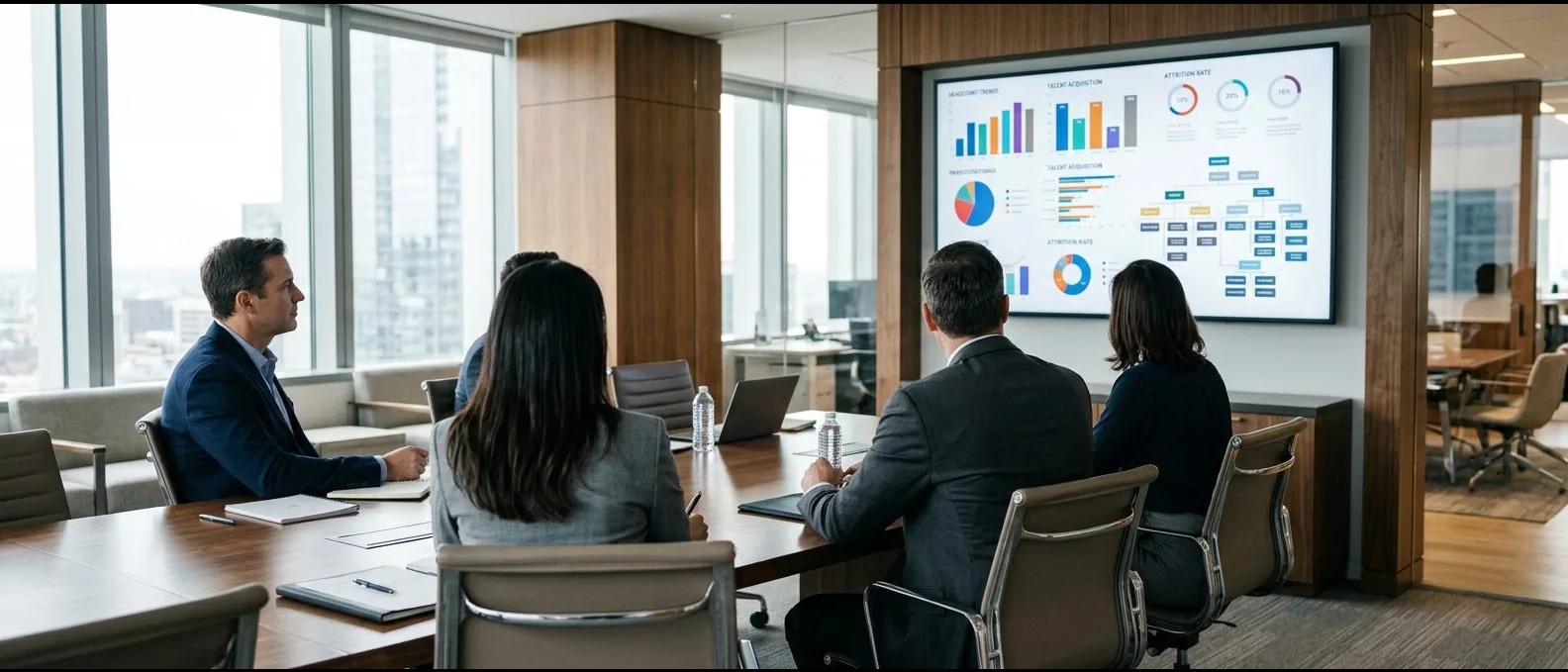
A single view of workforce health, covering supply and demand, nationalisation, succession gaps and training impact.
RoleLead UX Designer
Duration4 months
TeamProject Manager, Business Analysts, 2 Data Analysts, Designer, 5 Developers, and QA Engineers
SectorEnergy · Human capital
The problem
Workforce data sat in separate HR, learning and project systems, which made talent gaps hard to see early.
My contribution
Designed the dashboard system, covering research with HR leadership, the KPI hierarchy, the chart language and the filtering model.
The result
Seven views on three unified data sources, with live supply and demand forecasting.
Impact at a glance
HR leaders and business units can now make proactive, informed decisions that improve workforce resilience.
The Workforce Planning Dashboard is a centralised, data-driven platform that helps ensure the right talent is in place now and in the future. It supports goals around nationalisation, digital transformation and workforce optimisation in the energy and industrial sectors.
7Dashboard views
3Data sources unified
LiveSupply-demand forecasting
Key stage 01
Understanding the problem
The challenge
Organisations across exploration, refining, distribution and emerging technologies face complex workforce challenges. These include shortages of specialised talent, changing competency requirements and the need for agile succession planning.
Specialist talent shortages Hard-to-fill domains require planning well ahead rather than reactive hiring.
Evolving competencies Required skills change continually as technology and projects evolve.
Succession risk Adaptable succession planning depends on seeing people and roles together.
What I did
I interviewed HR leadership, business-unit heads and the people-analytics team about the questions they could not answer at the time.
I catalogued the HR, learning and project-forecast data sources and established where each metric was held.
I observed a quarterly workforce review to learn which numbers were disputed and which were trusted.
Primary goal
Bring HR, learning and project-forecast data together in one place.
Personas and context
Thomas Keller
Chief Human Resources Officer · Group HR
Executive user
She owns the nationalisation targets, succession plans and the workforce cost line, and presents to the executive committee every quarter.
Pain points
Headcount, cost and capability sit in three separate systems.
Nationalisation progress arrives late and is disputed.
Succession gaps surface only when someone resigns.
Goals
An executive summary that is always ready.
Supply forecast against demand, by domain.
Early warning of succession and skill gaps.
Miguel Santos
HR Business Partner · Refining & distribution
Day-to-day user
He works with line managers on hiring plans, engagement and training, and needs the slice of data for his business unit rather than the group.
Pain points
Requests to analytics take weeks.
Engagement survey results are hard to connect to attrition.
Training spend cannot be tied to outcomes.
Goals
Filter every view to his business unit.
See engagement, attrition and training together.
Answer a line manager's question in the meeting itself.
Key stage 02
Defining the structure before screen design
What we decided to build
The dashboard combines real-time data from HR systems, learning platforms and project forecasts into a single view of workforce health and talent needs. It supports supply and demand forecasting, tracks national workforce development, identifies succession gaps and skill shortages, and measures the impact of training. HR leaders and business units can therefore make proactive, informed decisions that strengthen workforce resilience and align human capital strategy with long-term goals.
Workforce health at a glance A clear view of headcount, capability and talent needs.
Supply-demand forecasting Projected needs compared with available talent, domain by domain.
Nationalisation and succession Tracks national workforce development and highlights succession gaps.
Skills and training impact Shows where shortages exist and whether training is closing them.
My role in this stage
I designed the dashboard system. The work covered research with HR leadership and business units, the KPI hierarchy, the chart language, the filtering model and the seven views HR leaders use in planning conversations.
Information architecture, flows and wireframes
01
Information architecture
I began with an executive summary, then added six lenses on the same workforce: cost, nationalisation, forecast, diversity, engagement and open-ended analytics.
02
User flow
I mapped how a quarterly review moves from the summary to a business-unit forecast and then to a hiring decision, with filters carried through each step.
03
Dashboard anatomy
Each view follows the same structure: a KPI headline row, two comparison charts, a trend and a breakdown table, so readers can predict where to look.
Key stage 03
Designing, testing and shipping with the team
The design
The seven views share one chart language: a consistent KPI card, a limited palette for categories and the same trend treatment throughout.
How we worked
With people analytics, I agreed metric definitions before any chart was drawn.
I worked with the Power BI developer on templates for KPI cards, comparison charts and trend panels.
I reviewed each view with an HR business partner, using their own unit's data.
How the product works
Step 01
Executive summary of workforce health
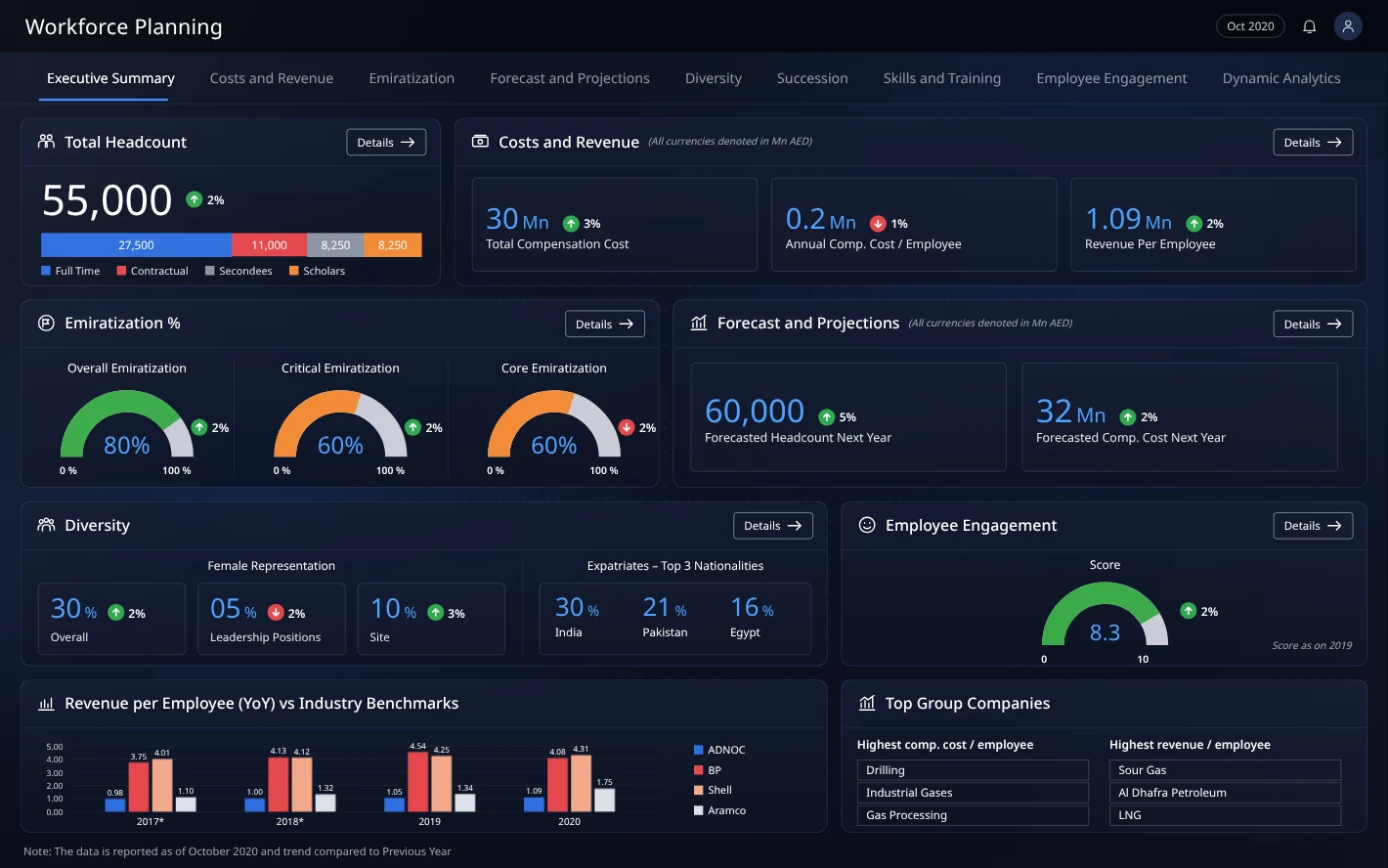
Headcount by contract type, compensation cost, national workforce share, forecast headcount, diversity and engagement each have their own card. Each card includes a Details link that opens the corresponding view.
Step 02
Workforce cost against revenue
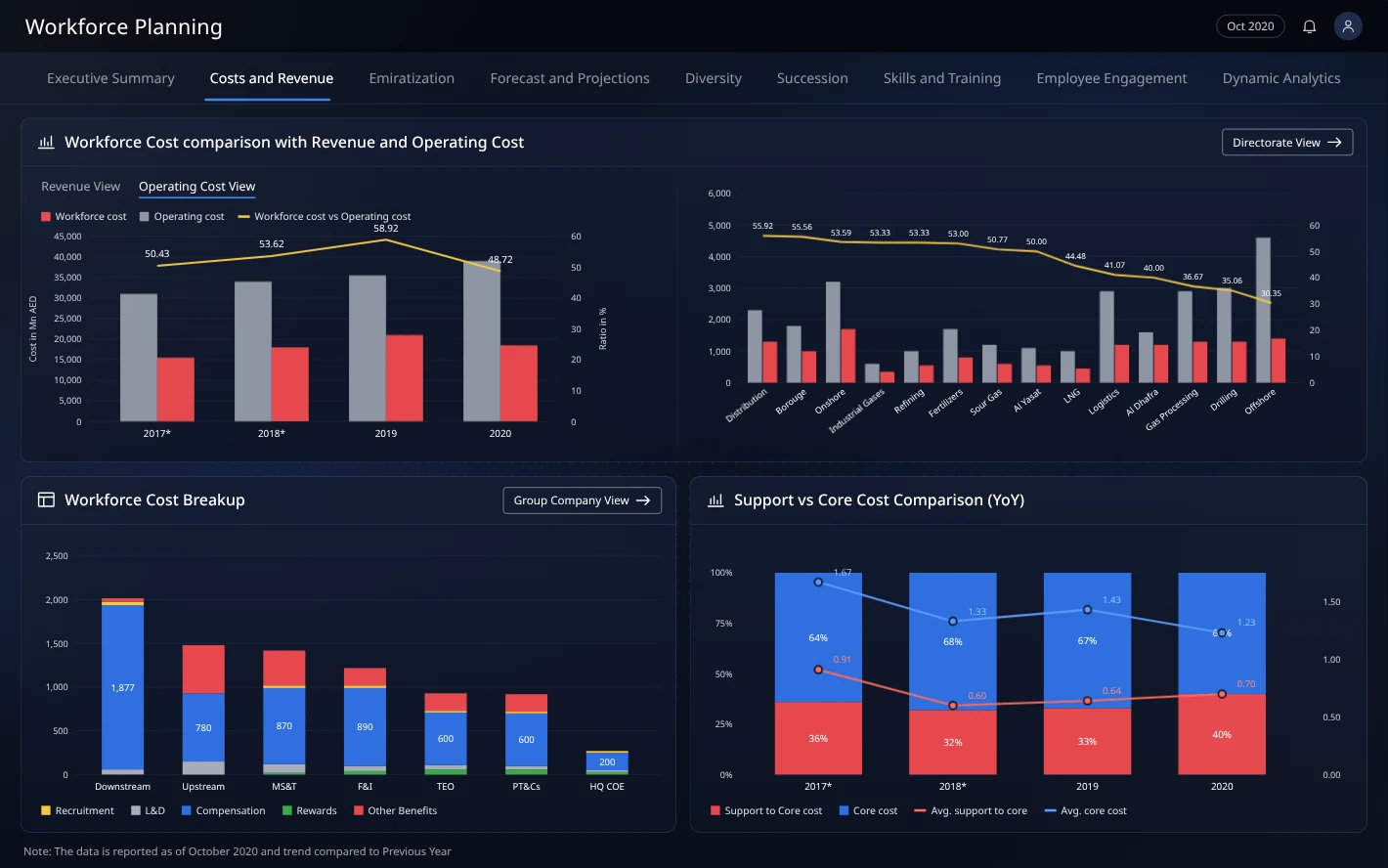
Compensation and operating cost are set against revenue for every group company. Leaders can see where the workforce is costly relative to the value it produces.
Step 03
Tracking national talent
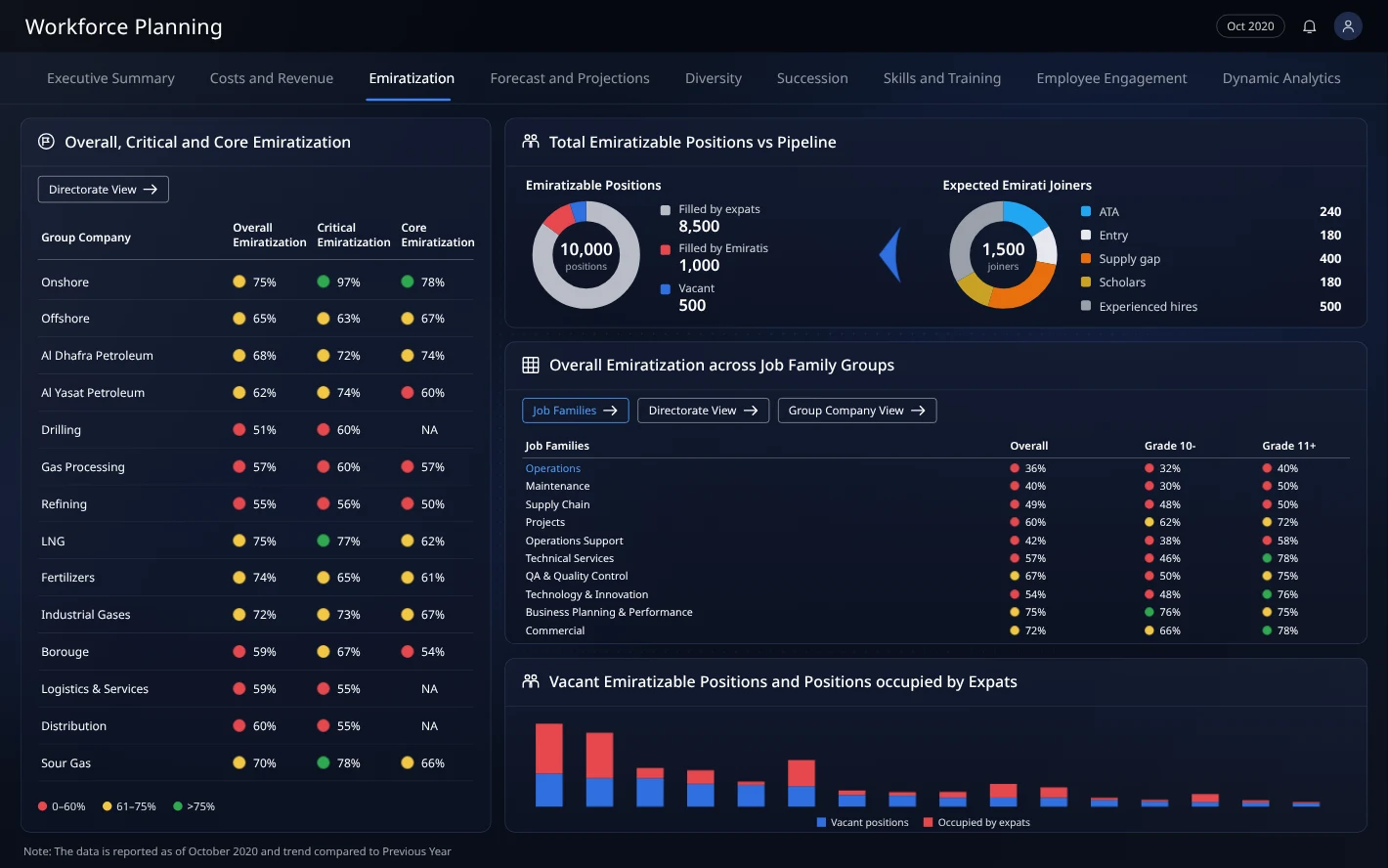
The screen presents overall, critical and core nationalisation rates by company and job family. Alongside them are the vacancies and talent pipeline that will move those rates.
Step 04
Forecasting supply and demand
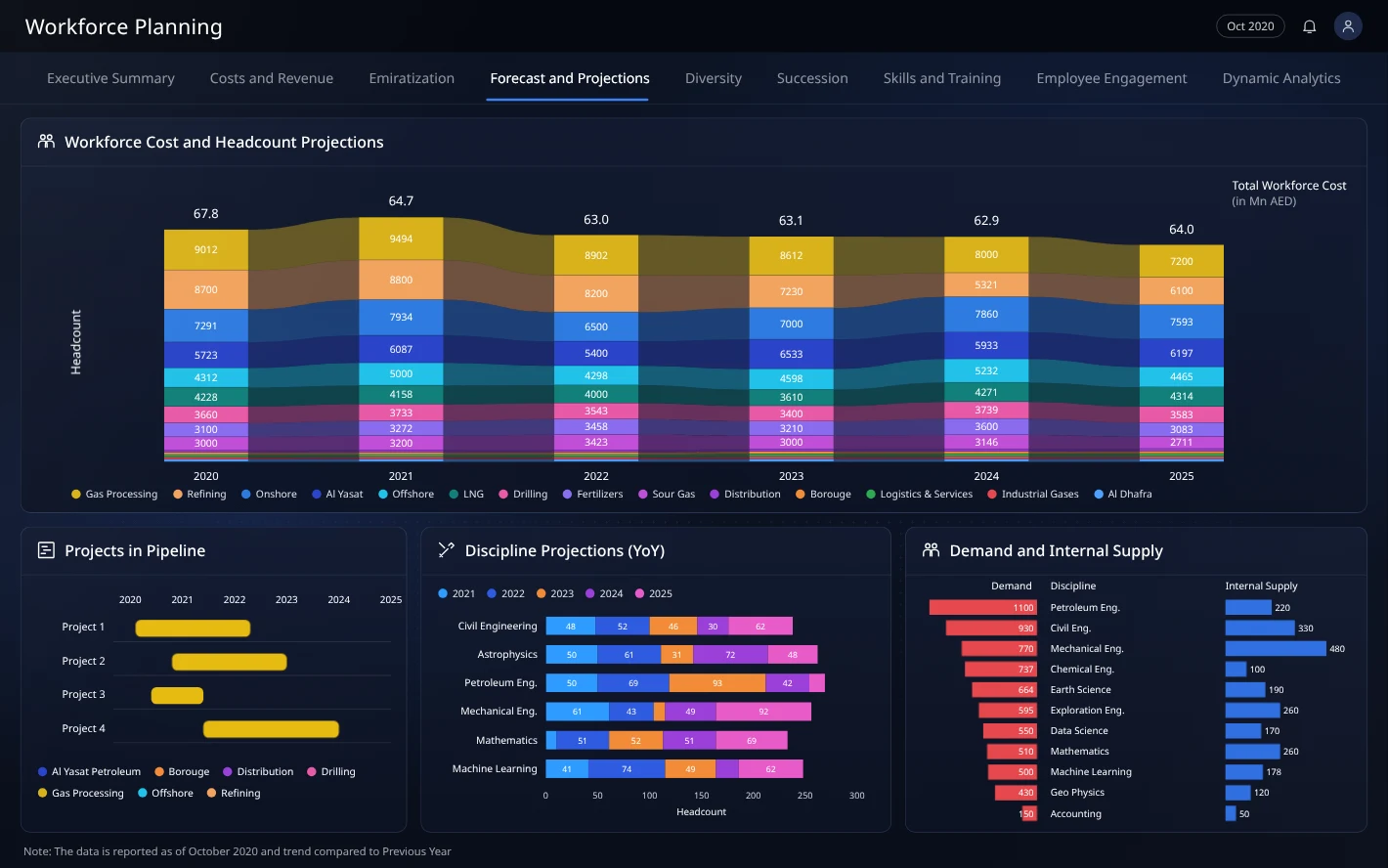
Headcount and cost projections extend five years ahead. The screen also shows projects in the pipeline and the gap between demand and internal supply for each discipline.
Step 05
Diversity across the organisation
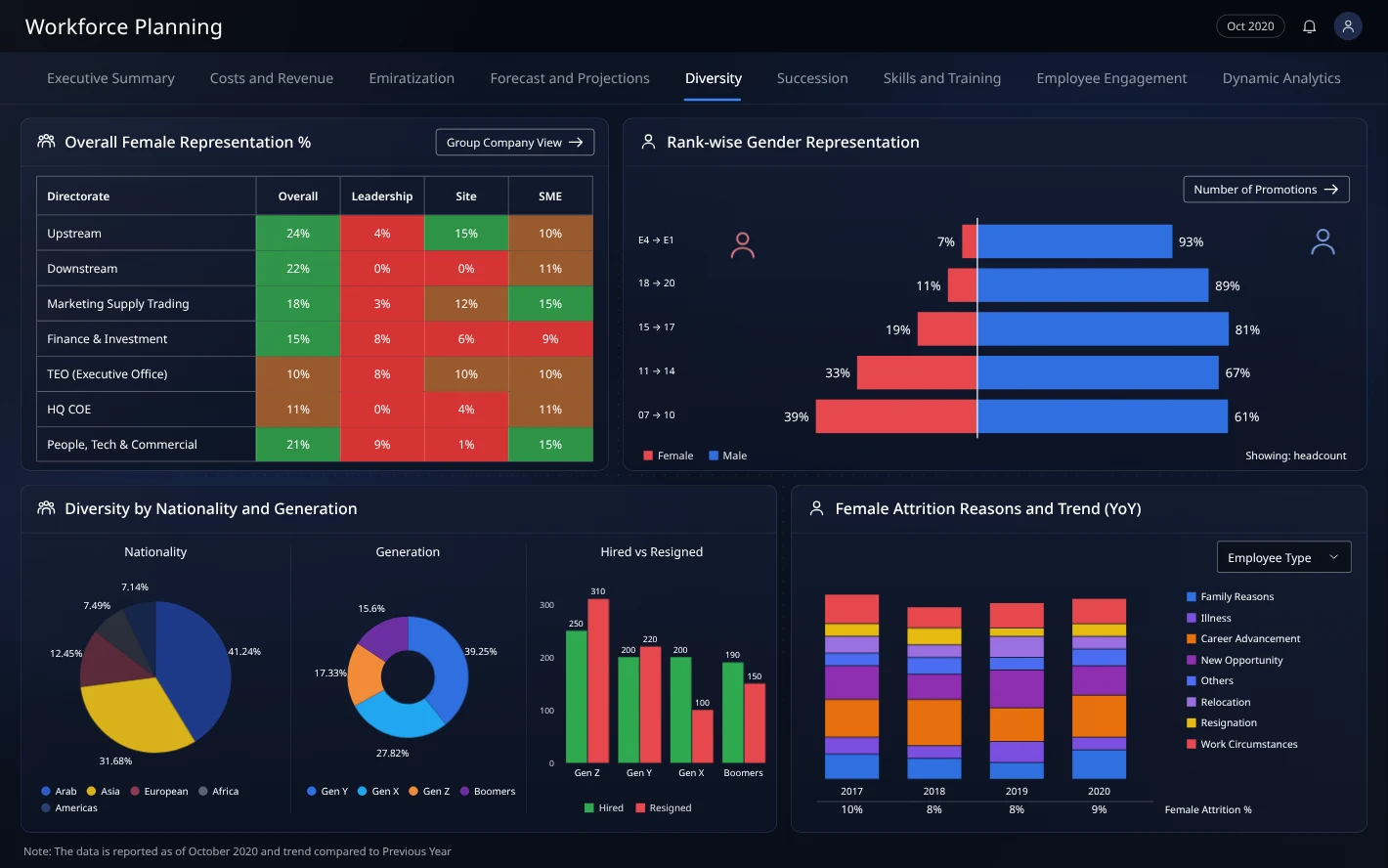
A single page combines female representation by directorate and level, gender ratio at each grade, nationality mix and attrition reasons.
Step 06
Succession for critical roles
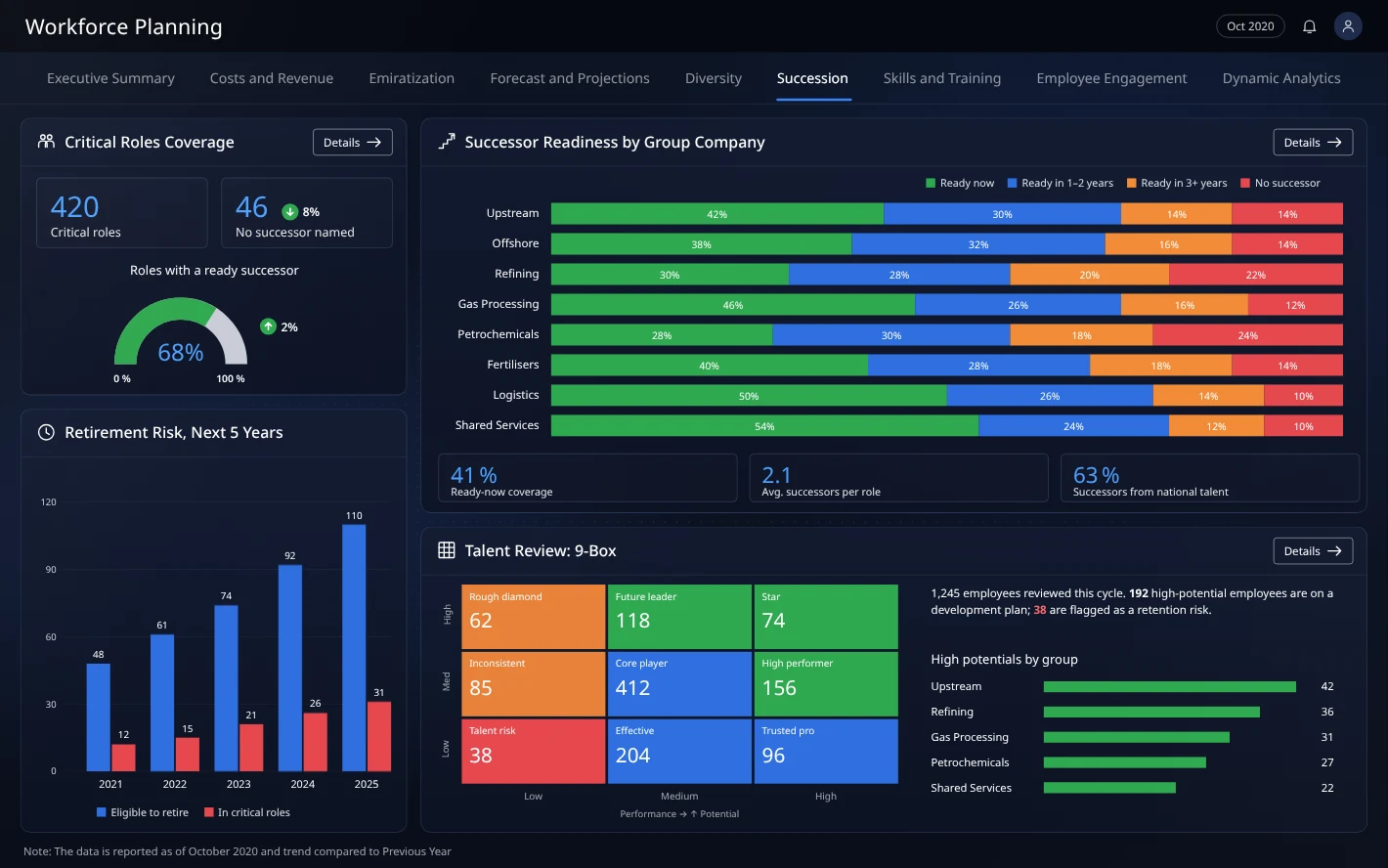
For each group company, the screen shows how many critical roles have a successor ready now, in one to two years, later or not at all. It is presented beside retirement risk and the talent review grid.
Step 07
Closing skill gaps with training
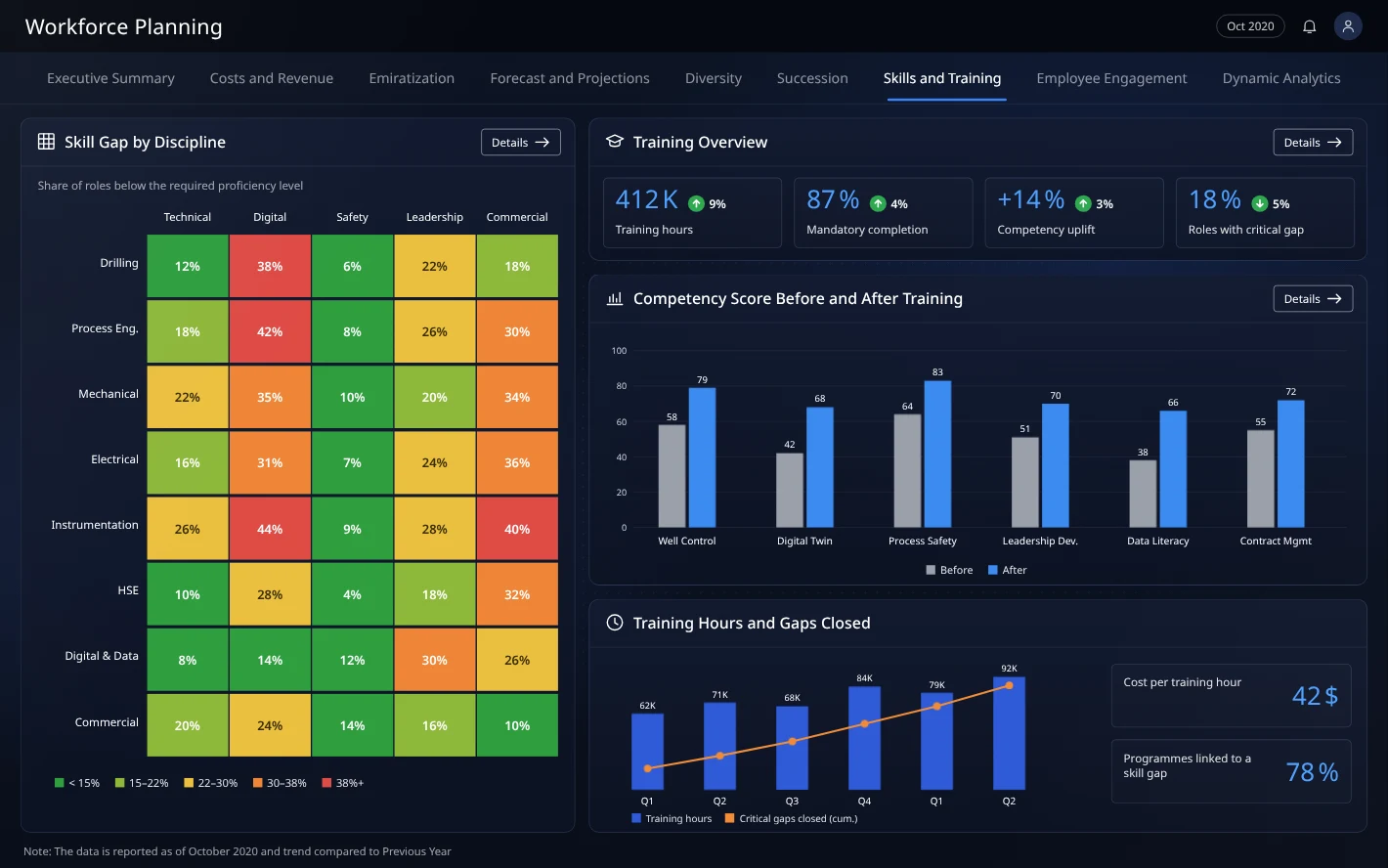
A heat map shows where each discipline falls short. Before-and-after competency scores show which programmes close the gap.
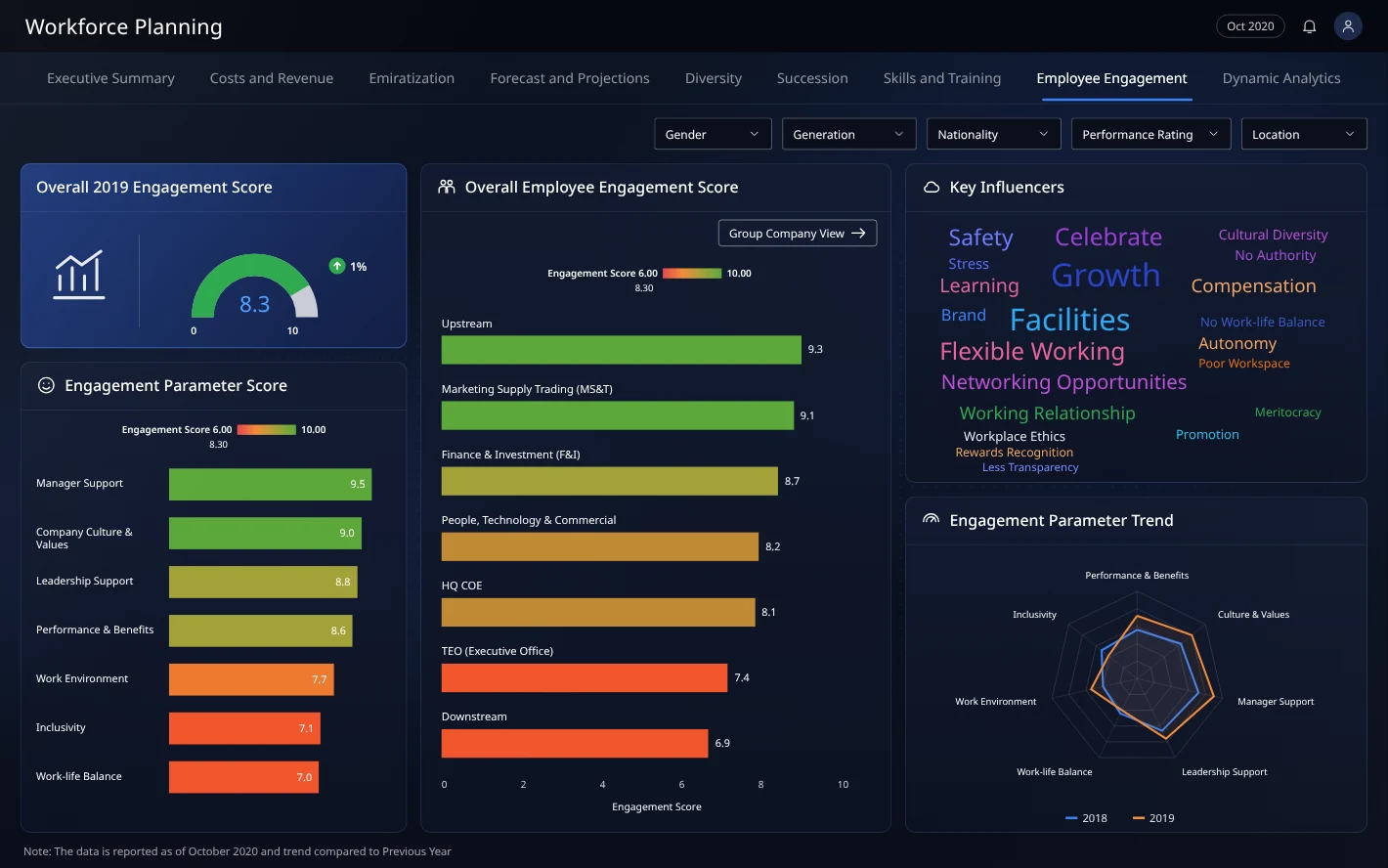
Step 08
Understanding employee engagement
The screen presents engagement scores, the drivers behind them and year-on-year change by parameter. It helps HR decide where to act first.
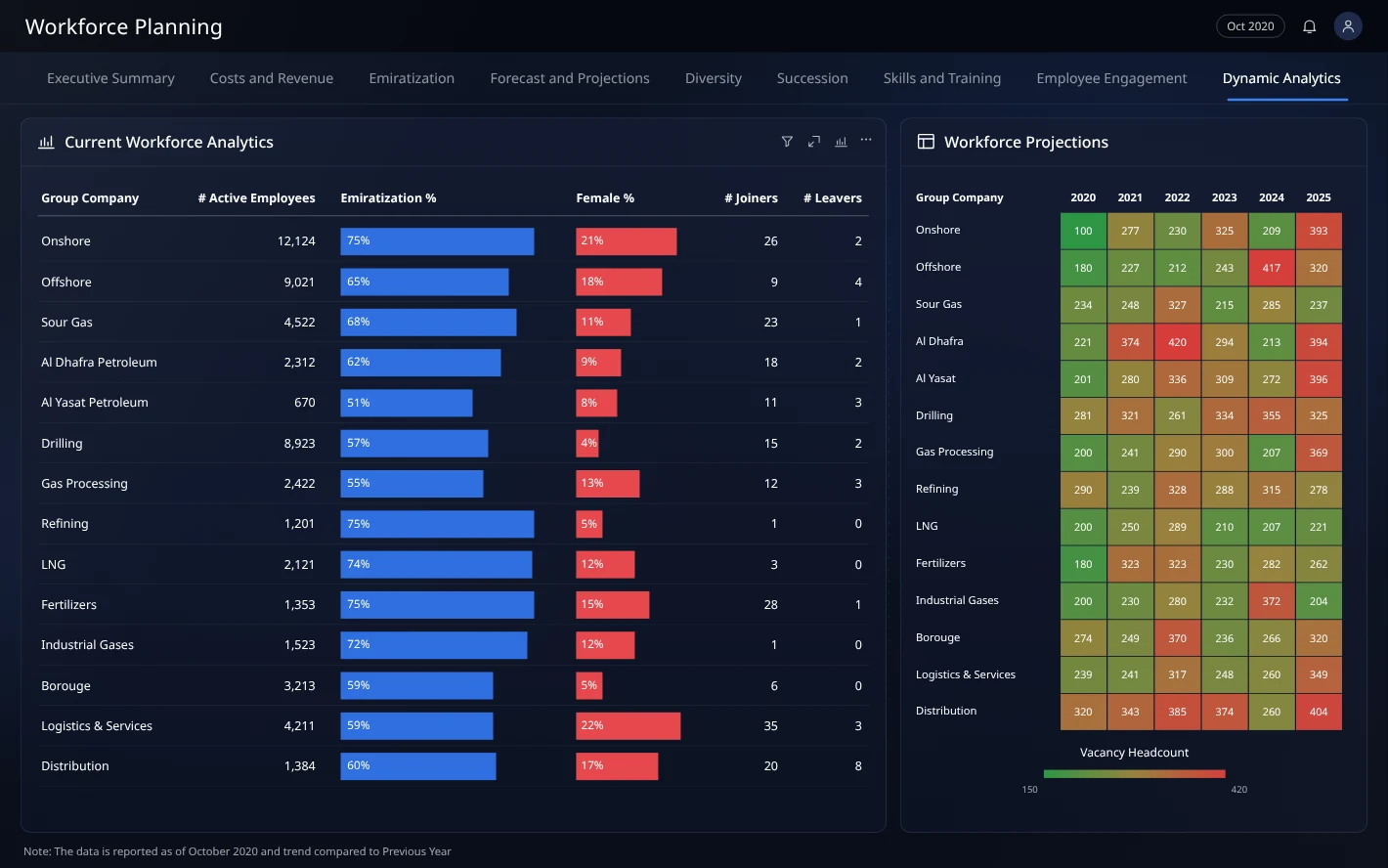
Step 09
Answering new questions without a new report
Dynamic Analytics lets HR analysts choose the measure and grouping themselves. One-off questions no longer wait for a developer.
Collaboration
How the team worked together
People analytics, HR business partners and the Power BI developer joined every review, because the hardest decisions concerned definitions rather than charts.
Project Manager
Held scope to the six lenses leadership reviewed each quarter and declined requests for one-off reports.
Business Analysts
Documented how each business unit reported headcount and training, so the differences were clear before we unified them.
Data Analysts (people analytics)
Agreed every metric definition with me before a chart was drawn. Headcount alone took two sessions.
Developers (Power BI)
Built templates for KPI cards, comparison charts and trend panels, so every view followed the same anatomy.
HR business partners (users)
Reviewed each view with their own unit's data and identified definitions that did not match how they planned.
Where the team changed the design
An HR business partner went through the forecast with real data and showed me that filters resetting between views disrupted their planning routine. Persistent business-unit filtering came out of that session, and it was the change that turned a reporting tool into a planning tool.
Paths not taken
What we considered and set aside
Three routes appeared faster than building a dedicated planning dashboard. None could bring engagement, attrition and training together, which was the core of the brief.
Option 1
Extend the HR system's built-in reports
Why it was temptingNo new tool and no new data pipeline.
Why we set it asideThe reports could not bring engagement, attrition and training into one view, and that combination was the purpose of the project.
Option 2
One dense, all-in-one executive page
Why it was temptingEverything visible at once.
Why we set it asideLeadership found it unreadable in testing. An executive summary followed by six focused lenses gave each decision its own place.
Option 3
Separate dashboards per business unit
Why it was temptingEach unit sees only its own data.
Why we set it asideSuccession and nationalisation planning require comparison across units. One structure with persistent filters met both needs.
Outcome
HR leaders and business units can now make proactive, informed decisions that improve workforce resilience.
7
Dashboard views
3
Data sources unified
Live
Supply-demand forecasting
Talent gaps reduced, because they are visible earlier.
Human capital strategy aligned with long-term organisational goals.
One trusted source for workforce conversations at leadership level.
Learnings & next steps
What I would carry forward
What I learned
01
Metric definitions were the hardest design decision. Headcount carried three different meanings across three teams until we agreed on one.
02
Business-unit filtering that persists across views turned a reporting tool into a planning tool.
03
Placing engagement, attrition and training side by side opened conversations that HR had previously been unable to support with data.
Next steps
→
I would add succession-plan tracking at role level, with readiness indicators.
→
I would model hiring scenarios against the forecast, so leaders can test plans before committing budget.
→
I would extend the dashboard to contractors and the project-based workforce, which are currently out of scope.