A live view of electricity and water service risk across IT, operations and physical assets, integrated into existing tools.
RoleLead UX Designer
Duration5 months
TeamProject Manager, Business Analysts, 2 Data Analysts, Designer, 4 Developers, and QA Engineers
SectorUtilities · Energy & Water
The problem
Risk data sat in disjointed legacy systems across IT, operations and physical assets.
My contribution
Led the UX end to end, including stakeholder interviews, information architecture across seven views and the visual language for risk scoring.
The result
One real-time view of three risk domains inside the tools teams already use, with no new tool to learn.
Impact at a glance
Teams can now assess, compare and mitigate risks in one place, and they make decisions faster and with better information.
The Risk Management Dashboard monitors electricity and water service risk through a visual dashboard. It forms part of a broader digital transformation strategy to improve enterprise risk management, and it sits inside the tools teams already use. It supports risk monitoring, compliance and data-driven decisions, and contributes to a more citizen-focused service environment.
3Risk domains consolidated
LiveMonitoring and comparison
0New tools for users to learn
Key stage 01
Understanding the problem
The challenge
As operations expanded into energy, sustainability and digital infrastructure, including large solar parks and grid projects, risks grew in both complexity and scale. They span IT infrastructure, operational procedures and physical assets. Legacy risk management systems were disjointed and slow to respond, which created a need for a more streamlined and unified approach.
Growing risk surface Energy, sustainability and digital infrastructure projects continued to add risks that needed tracking.
Disjointed legacy systems The tools were slow and fragmented, so they could not keep pace with changing threats.
No unified picture IT, operational and physical risks were each assessed separately.
What I did
I interviewed the enterprise risk office and divisional risk champions to understand how risks were logged, scored and escalated.
I traced a real risk from register entry to board report to identify where it stalled.
I reviewed the customised enterprise risk framework so that the scoring, categories and thresholds matched policy exactly.
Primary goal
Bring IT, operational and physical asset risk into one view.
Personas and context
Marcus Bennett
Chief Risk Officer · Enterprise risk office
Executive user
Answers to the board for the organisation's risk posture across electricity and water services. Needs the corporate picture at a glance, with detail one click away.
Pain points
Divisional reports arrive in different formats and on different dates.
No forecast shows which way the threat posture is heading.
Mitigation status has to be chased by email.
Goals
A corporate overview that is always up to date.
Divisions compared on the same scale.
Late mitigations identified before the board raises them.
Arjun Menon
Divisional Risk Champion · Operations division
Day-to-day user
Maintains the division's risk register, scores new risks and keeps mitigation plans moving. Most of the working week is spent in spreadsheets.
Pain points
Entering the same risk into three documents.
Unable to tell whether a score is high enough to escalate.
No feedback once a risk leaves the division.
Goals
Log and score a risk once, in one place.
Clear thresholds and automatic escalation.
The ability to follow a risk after it is escalated.
Key stage 02
Defining the structure before screen design
What we decided to build
The dashboard is built on a customised enterprise risk management framework. It gives teams a real-time view of organisational risk so that they can assess, compare and mitigate risks faster. By consolidating risk data within the tools teams already use, it strengthens governance and operational resilience.
Comprehensive real-time view People see the organisation's risk at a glance and can drill down for detail when needed.
Assess, compare, mitigate Workflows help teams move quickly from awareness of a risk to action on it.
Embedded in Office Risk data is consolidated where people already work, which supports governance and resilience.
My role in this stage
I led the UX for this dashboard from start to finish. My work covered interviews with the risk office and divisional risk champions, the information architecture across seven views, the visual language for the risk heat map and scoring, and the dashboard's behaviour inside the Office environment.
Information architecture, flows and wireframes
01
Information architecture
I ordered the seven views from the widest lens to the narrowest: corporate, divisional, register, analytics, risk card, monitoring and usage.
02
User flow
This maps the risk lifecycle the dashboard supports, from identification to monitoring, and shows which view serves each step.
03
Dashboard anatomy
Each view places the KPI strip, heat map and trend on the left and detail tables on the right. A consistent structure throughout means people need to learn it only once.
Key stage 03
Designing, testing and shipping with the team
The design
I applied a single colour scale for risk level throughout, so the heat map, gauges, register rows and mitigation status chips all communicate the same meaning.
How we worked
I worked with the data team to map register fields onto the framework's scoring model.
I partnered with Power BI developers on component templates for gauges, heat maps and status chips.
Before release, we tested the register and risk-card flows with divisional champions.
How the product works
Step 01
The whole organisation on one page
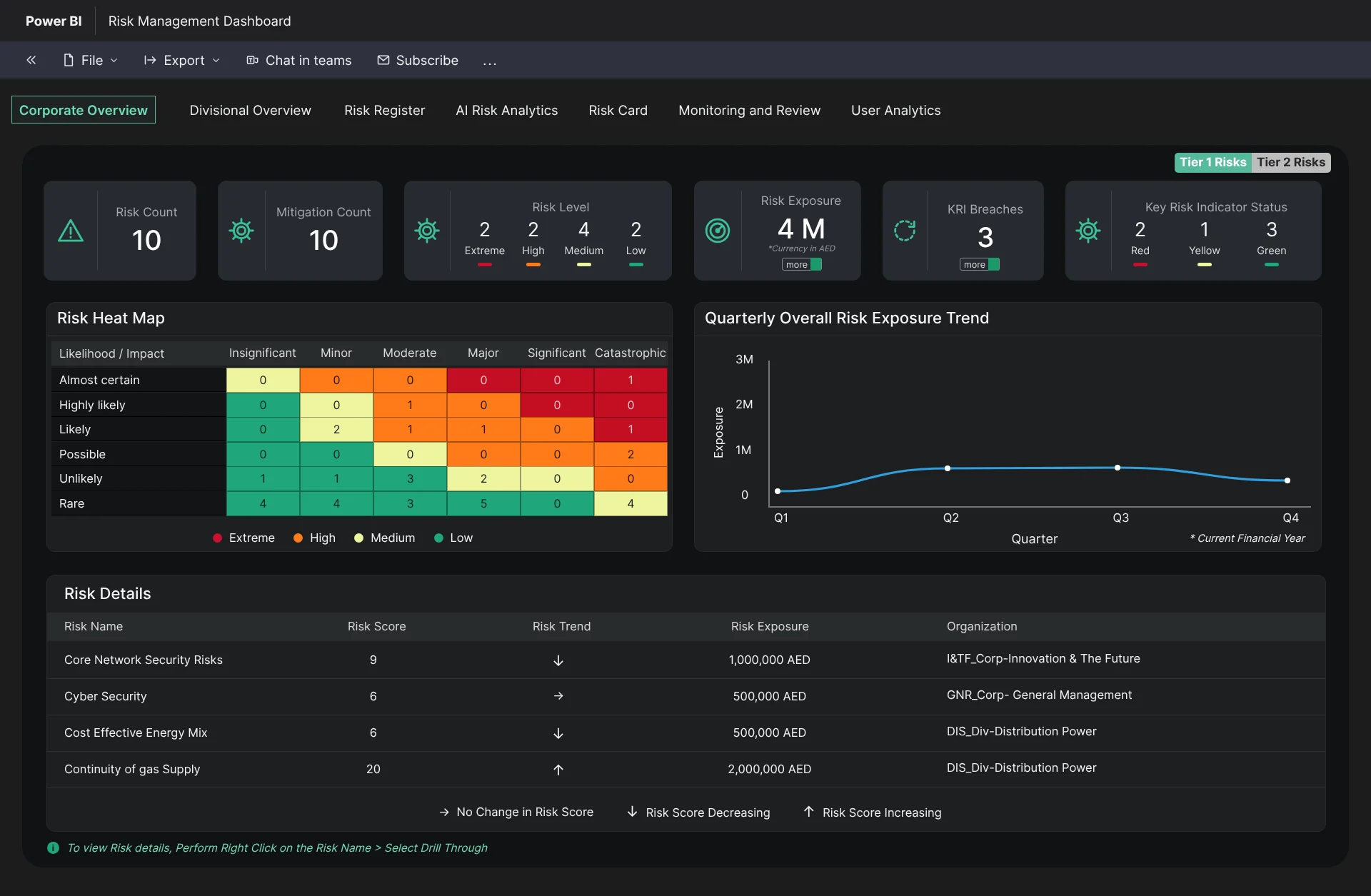
Corporate Overview opens with the risk count, mitigations, risk levels, exposure and KRI breaches. A likelihood-by-impact heat map and the exposure trend for the quarter follow below.
Step 02
Comparing divisions side by side
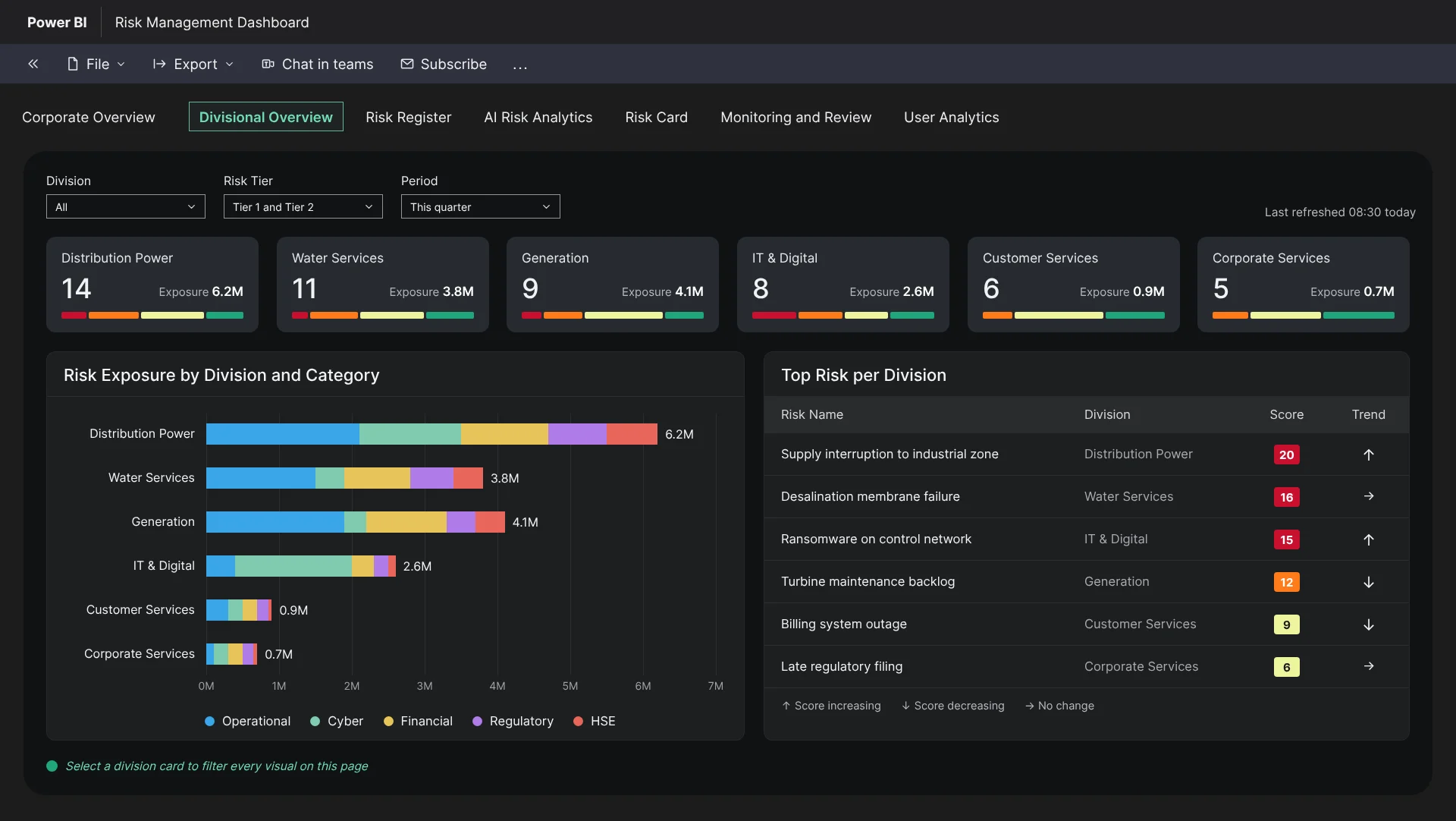
Each division has a card showing its risk count, exposure and mix of levels. Leaders can see where risk sits before opening a single register row.
Step 03
One register for every risk
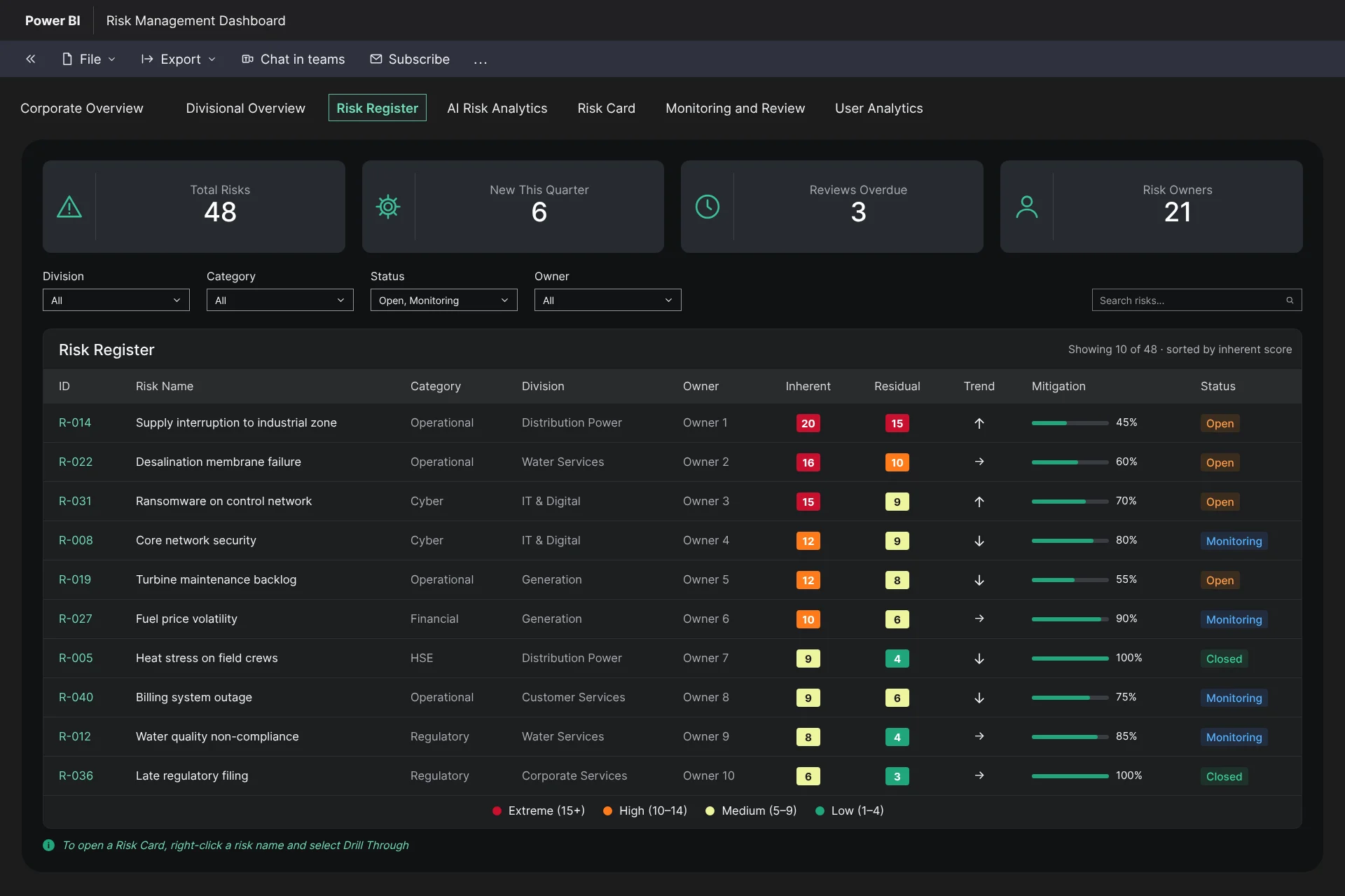
The register presents inherent and residual scores, trend, owner and mitigation progress in a single table. It uses the same colour scale as the heat map.
Step 04
A risk card for each risk
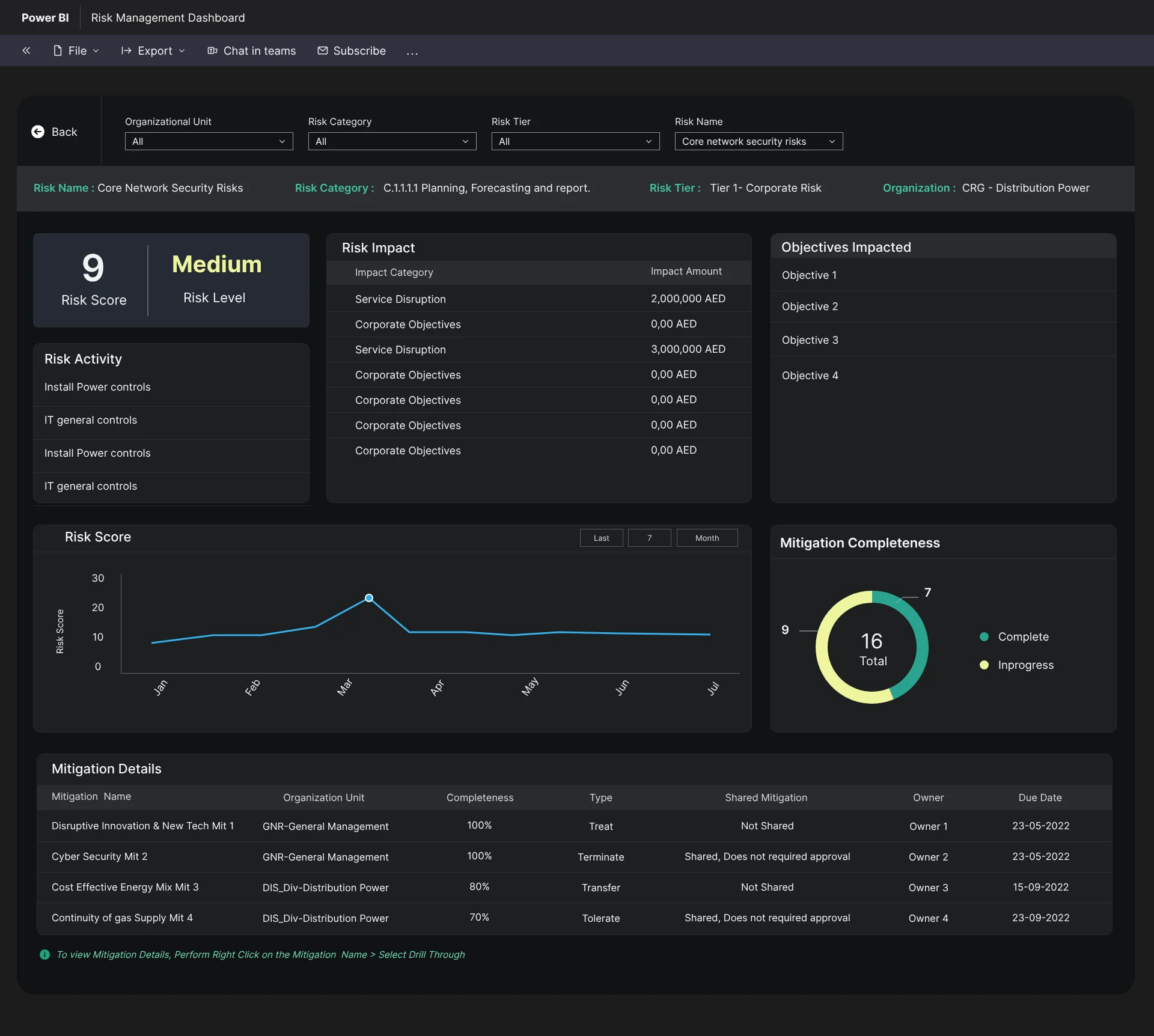
Opening a risk displays its score and level, the impact by category and the objectives it threatens. The card also shows the score history and every mitigation with its owner and due date.
Step 05
AI signals before they become incidents
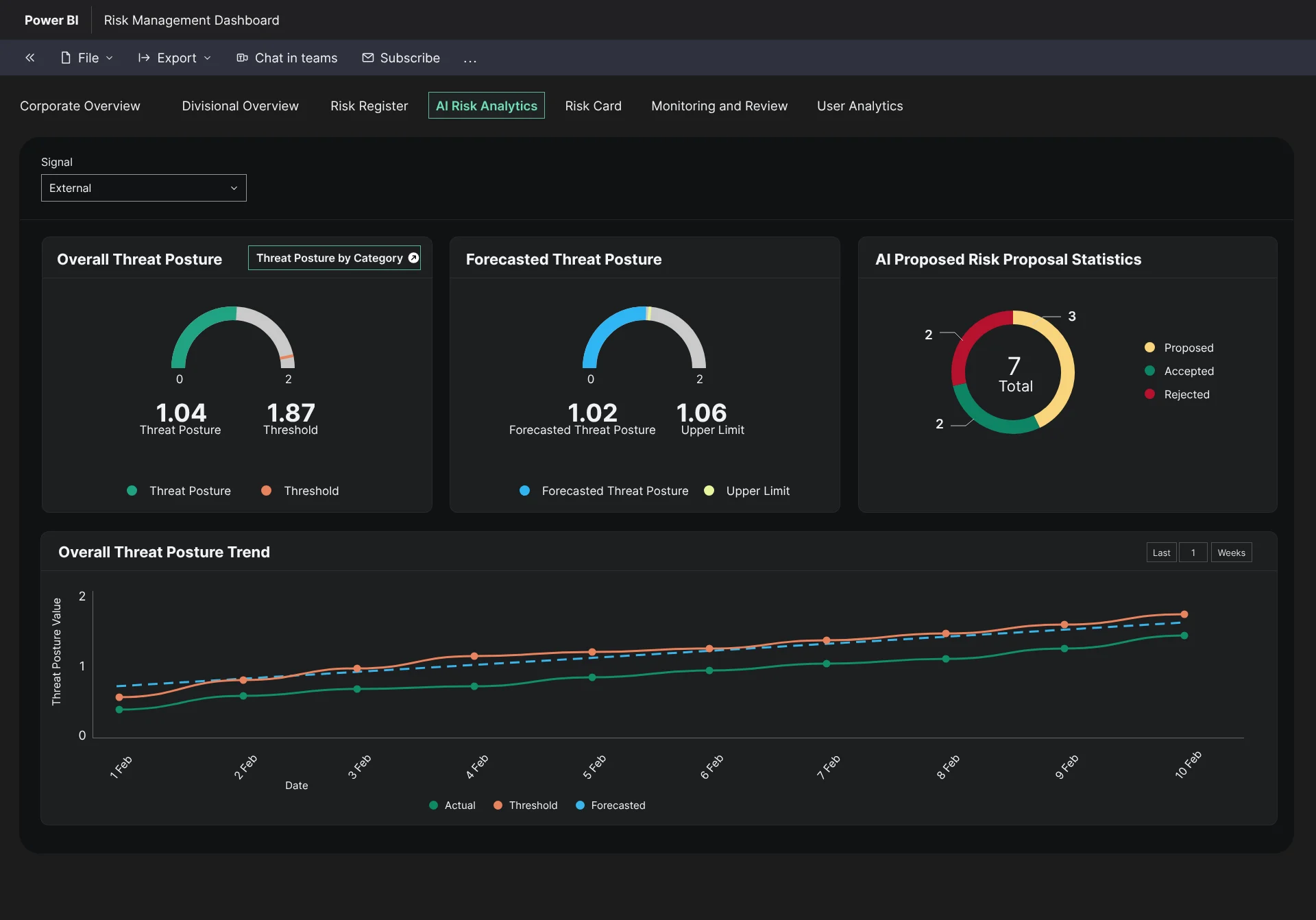
External signals are converted into a threat posture, with a forecast and an upper limit. Teams can watch a risk building before it breaches.
Step 06
Threat posture by category
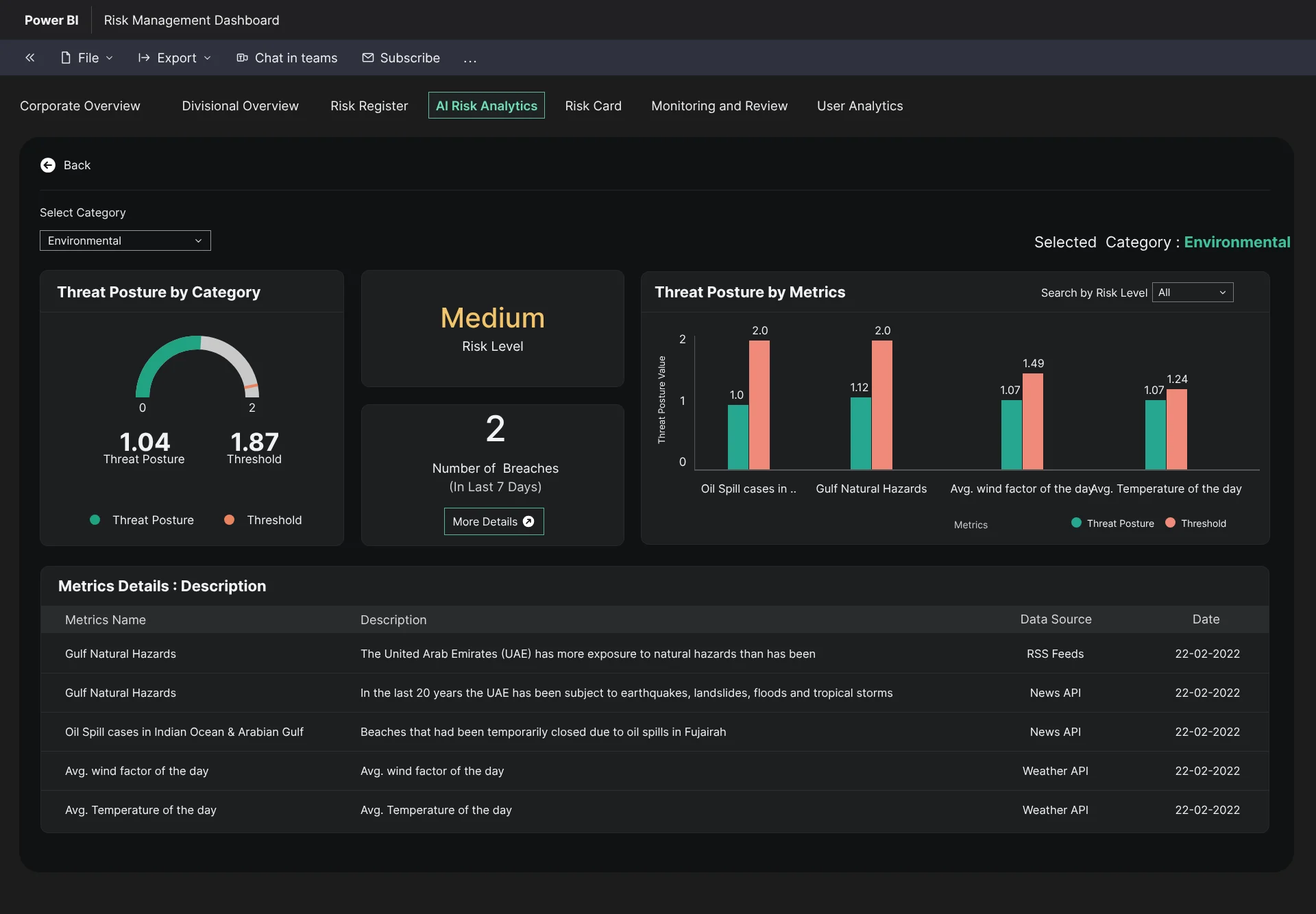
Each category, such as environmental risk, shows its posture against the threshold, its recent breaches and the data sources behind every metric.
Step 07
Monitoring plans and indicators
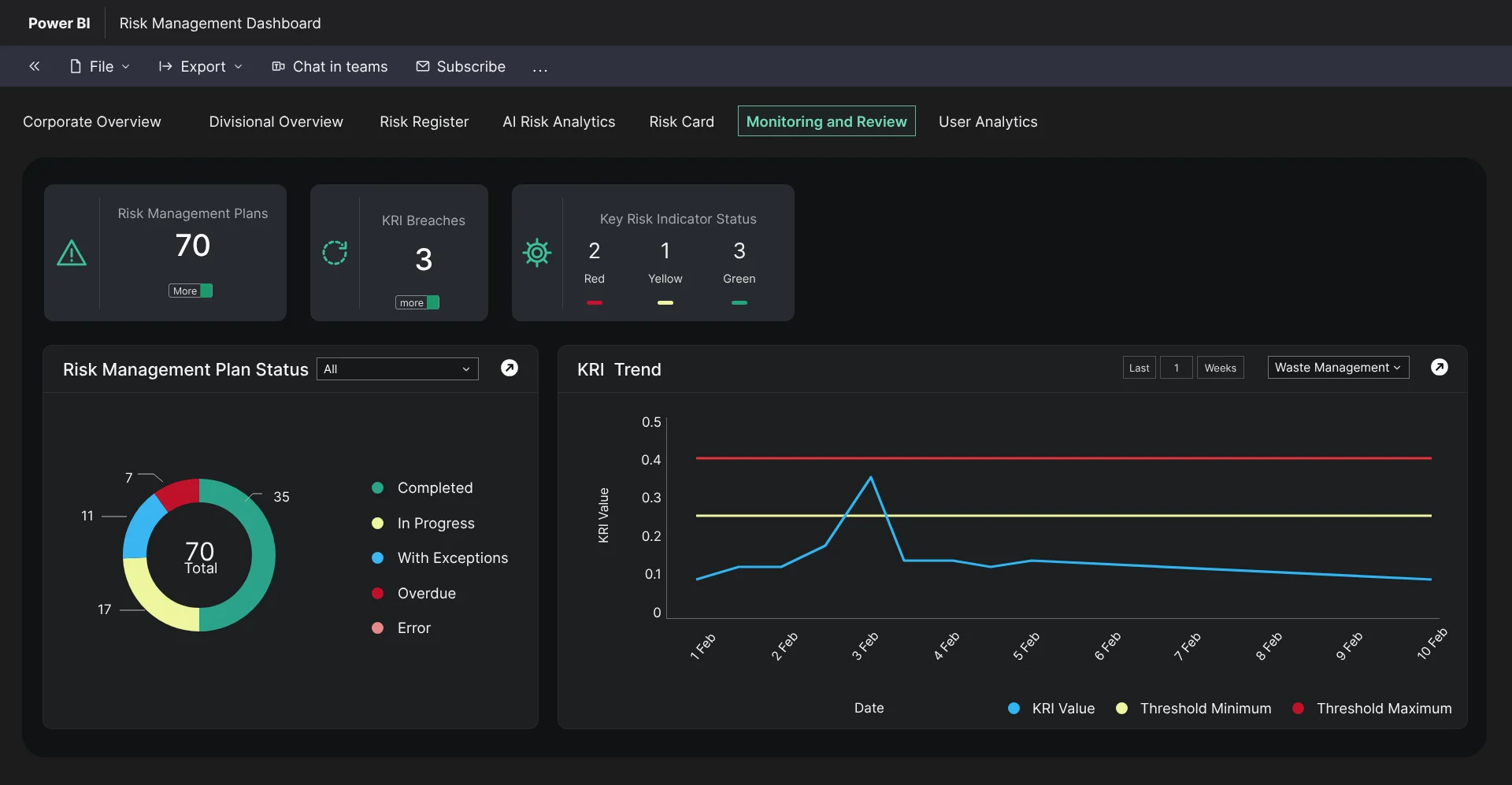
Risk management plans are tracked by status. Each key risk indicator is plotted against its minimum and maximum thresholds.
Step 08
Measuring adoption
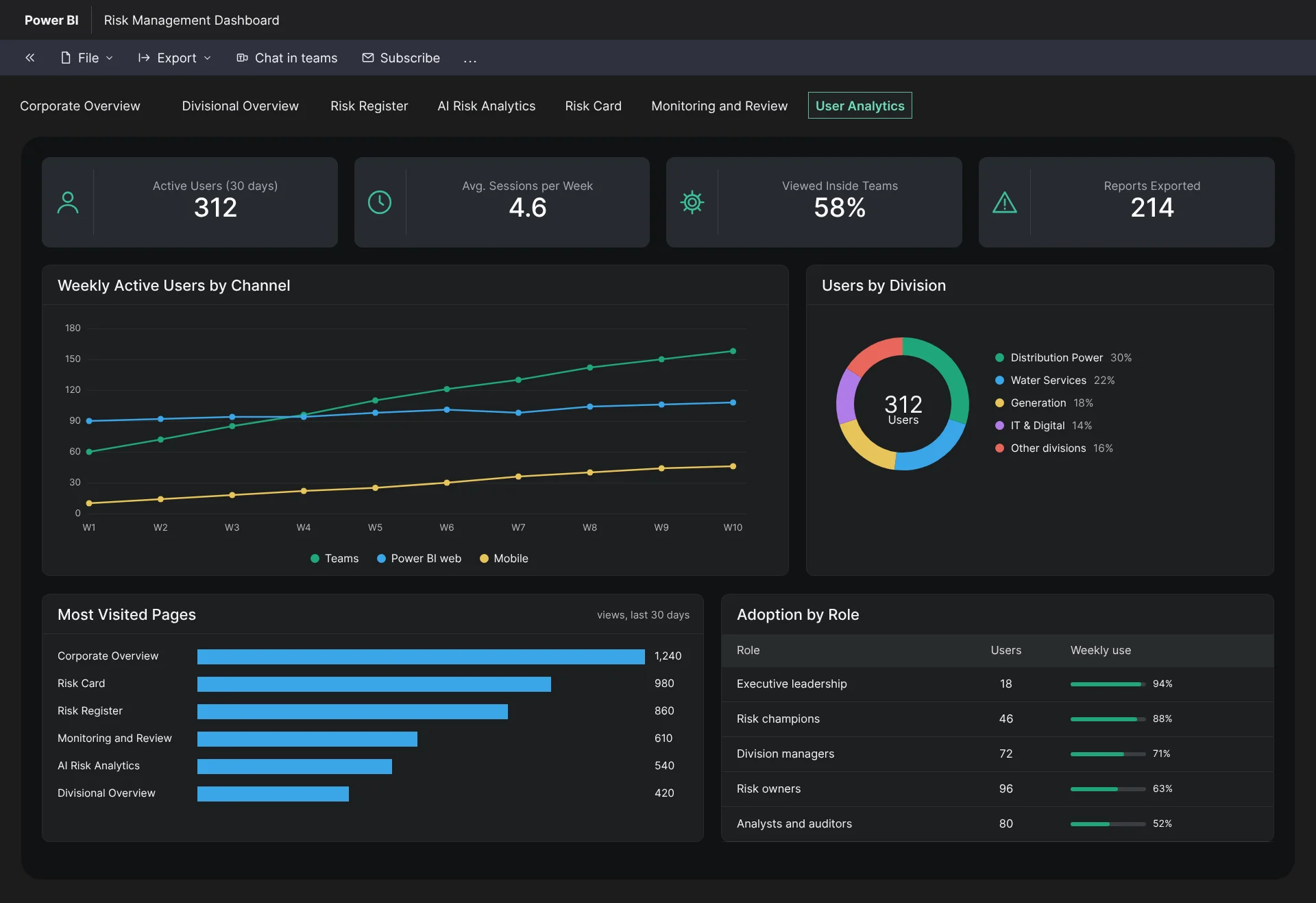
User Analytics shows who uses the dashboard, through which channel and on which pages. It showed that embedding the dashboard in Teams changed how often it was opened.
Collaboration
How the team worked together
Risk framework owners, data analysts, Power BI developers and divisional champions each shaped a different layer of the dashboard.
Project Manager
Aligned the release plan with the risk framework roll-out, so that each division's champions were trained as their view went live.
Business Analysts
Mapped register fields to the scoring model and kept the wording consistent with the governance policy.
Data Analysts
Worked with me on the scoring and trend calculations so that the dashboard matched what the risk committee reported.
Developers (Power BI)
Built component templates for gauges, heat maps and status chips from the anatomy rules, which kept every view consistent.
Divisional risk champions (users)
Tested the register and risk-card flows and advocated for the card to carry more detail than the overview.
Where the team changed the design
Champions challenged an early version that led with executive charts. They explained that their work centred on the register and the risk card, not the overview, and this changed both the order of the views and the amount of detail at each level.
Paths not taken
What we considered and set aside
We weighed three alternatives before settling on one embedded, unified dashboard. Each would have been easier to deliver, and each would have kept risk in silos.
Option 1
A standalone risk web application
Why it was temptingFull control of the interface and interactions.
Why we set it asideIt would have required another login and another tool to learn. Embedding the dashboard in the Office environment that teams already used removed the main barrier to adoption.
Option 2
Separate dashboards for IT, operational and physical risk
Why it was temptingEach team gets a tailored view.
Why we set it asideIt would have preserved the siloed picture the project was meant to remove. One structure with divisional filters kept the view unified.
Option 3
A single colour scale per risk type
Why it was temptingMore precise for specialists.
Why we set it asideNon-specialists could not read across the views. One shared scale throughout was simpler, and it tested better with the committee.
Outcome
Teams can now assess, compare and mitigate risks in one place, and they make decisions faster and with better information.
3
Risk domains consolidated
Live
Monitoring and comparison
0
New tools for users to learn
One real-time view across IT, operations and physical assets.
Faster, better-informed mitigation decisions.
Stronger governance and operational resilience.
Learnings & next steps
What I would carry forward
What I learned
01
Using one colour scale for risk throughout improved comprehension more than any single chart did.
02
The risk card proved to be the most heavily used view. Executives wanted the overview, while champions spent their time in the card and the register.
03
Embedding the dashboard in the Office environment removed the biggest barrier to adoption, which was yet another login.
Next steps
→
Automate escalation notifications when a score crosses a threshold, with the owner and plan attached.
→
Add a forecast view that projects threat posture from the current trend.
→
Review user analytics after one quarter to identify which divisions need onboarding support.