A digital stage-gate platform replacing a paper-based capital project process that two earlier transformation attempts had not changed.
RoleLead UX Designer
Duration10 months
TeamProject Manager, Business Analysts, Designer, 6 Developers, and QA Engineers
SectorEnergy · Oil & Gas
The problem
A paper-based capital project process, with two earlier digital attempts abandoned.
My contribution
Led research, personas, information architecture and prototypes, and supported change management.
The result
30% more efficient processes and 50% less paper documentation.
Impact at a glance
PGS modernised project workflows and delivered clear operational gains.
The Project Gate System (PGS) is a framework that brings structure and consistency to the planning and execution of surface facilities capital projects. It divides each project into phases aligned with business objectives, financial benchmarks and operational requirements, and it can be adapted to different project scopes and risk profiles.
30%Increase in process efficiency
50%Reduction in paper documentation
HigherAdoption by PMs and field teams
Key stage 01
Understanding the problem
The challenge
Capital project management relied on outdated, paper-based processes with fragmented workflows, which slowed approvals and increased errors. Earlier digital initiatives had not succeeded because teams resisted the change, and the paper-based approach also conflicted with the organisation's sustainability goals.
User resistance Following past failures, teams were cautious about adopting digital workflows again.
Fragmented process Disconnected workflows slowed approvals and decisions.
Redundant manual work Extensive paperwork increased the likelihood of errors and duplicated effort.
Sustainability gap Paper-based working conflicted with the company's environmental commitments.
What I did
I interviewed programme administrators, project managers and engineers about their experience of the gate process.
I developed personas around the manual, paper-driven pain points of each role.
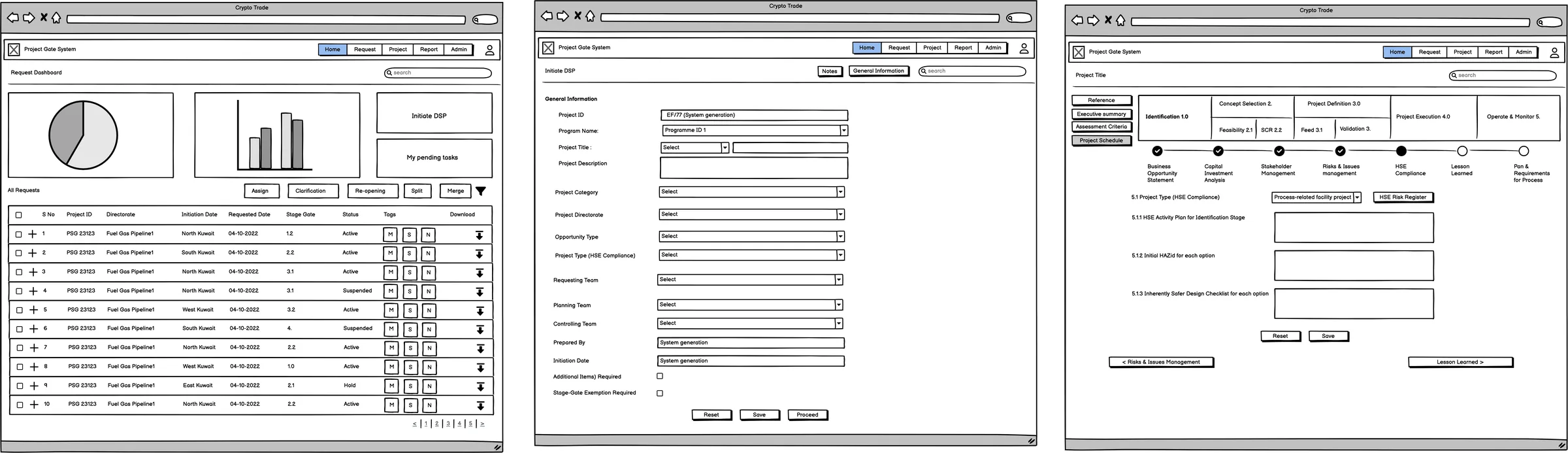
I mapped the capital project journey from the initial business need to hand-over.
Primary goal
Replace printed documents and handwritten notes with a structured digital workflow.
Personas and context
Ryan Mitchell
Senior Manager, Program Administration
Requester
Ryan leads a team of ten that administers the capital programme, covering project plans, performance reports, survey reports and audit reports. The gate system is part of his daily responsibility.
Pain points
A complex system that requires heavy manual data entry.
An unreliable experience with no dashboards or analytics.
No means of seeing how the team is performing.
Slow communication between the department and management.
Goals
Delegate effectively and raise productivity.
Track progress in real time and use resources well.
Shorten turnaround time on requests.
Automate simple tasks and reduce human hand-offs.
David Thornton
Vice President, Capital Projects
Gate approver
David sponsors the capital programme and chairs the gate reviews. A DSP reaches him only at G 1.0, where he must often decide in a single sitting whether the project proceeds, returns for rework or stops.
Pain points
Decision support packages arrive as long documents with the key numbers buried.
No single view of the projects awaiting a gate.
Difficulty identifying what has changed since the last review.
Approvals and comments scattered across email.
Goals
A one-page summary of each DSP before the gate meeting.
All projects visible by stage and gate status at a glance.
Approve, rework or stop, with a clear audit trail.
Early notice of overdue risk reviews before they delay a gate.
Key stage 02
Defining the structure before screen design
What we decided to build
The redesigned PGS is a digital platform built on a stage-gate methodology, with defined deliverables and checkpoints at every gate. An intuitive interface, automated workflows and built-in risk management tools replaced paper reviews with clear, trackable approvals.
Stage-gate approach Standardised project phases make resource planning easier.
Clear deliverables Clear expectations at every gate support more decisive decisions.
Stakeholder engagement Shared features give project teams and leadership a common working view.
Built-in risk management Early visibility of issues reduces costly rework.
Cost optimisation Better planning data improves budget accuracy.
My role in this stage
As Lead UX Designer, I led the research, personas, information architecture, wireframes and prototypes. I also ran usability sessions and supported change management to secure adoption of the new system.
Information architecture, flows and wireframes
01
Information architecture
I began with a stage-by-stage structure that reflects how capital projects are governed in practice.
02
User flow
I then defined how a project moves through the gates, who approves what, and where the risk reviews sit.
03
Low-fidelity wireframes
Finally, I designed screens for engineers and project managers, then tested and refined them with real users.
Key stage 03
Designing, testing and shipping with the team
The design
The high-fidelity interface brings dashboards, gate checklists, site evidence, committee decisions and portfolio reporting into one place. I tailored it to people who had preferred paper.
How we worked
I worked with engineering to translate the research into functional features.
I proposed change-management measures to encourage adoption and reduce resistance.
I led the usability testing to validate our decisions and improve the efficiency of the system.
How the product works
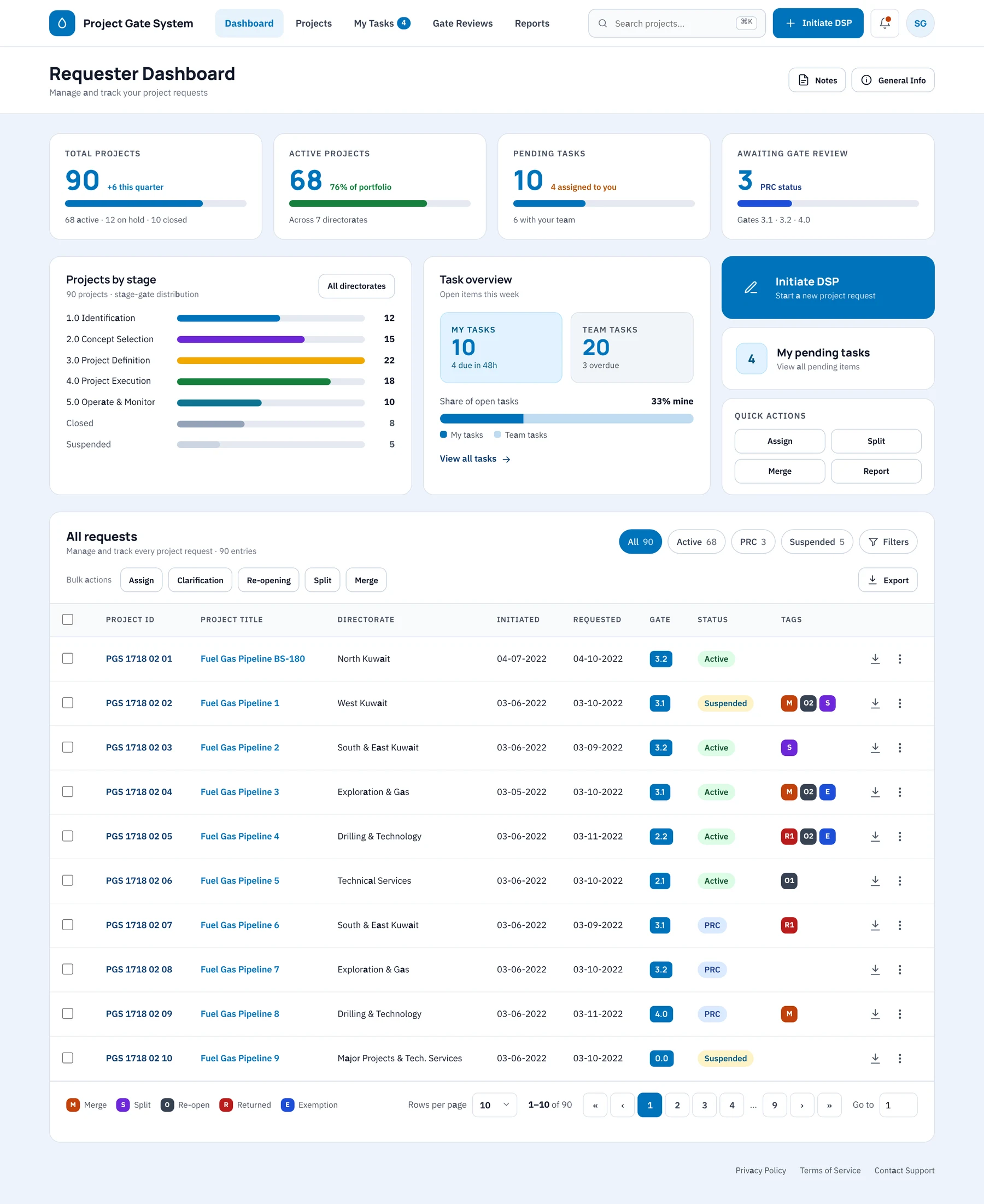
Step 01
A dashboard that leads with pending work
Requesters see total, active and pending work at a glance, together with projects by stage, their share of open tasks and quick actions. Below, a full request table shows gate, status and merge, split, re-open and exemption tags.
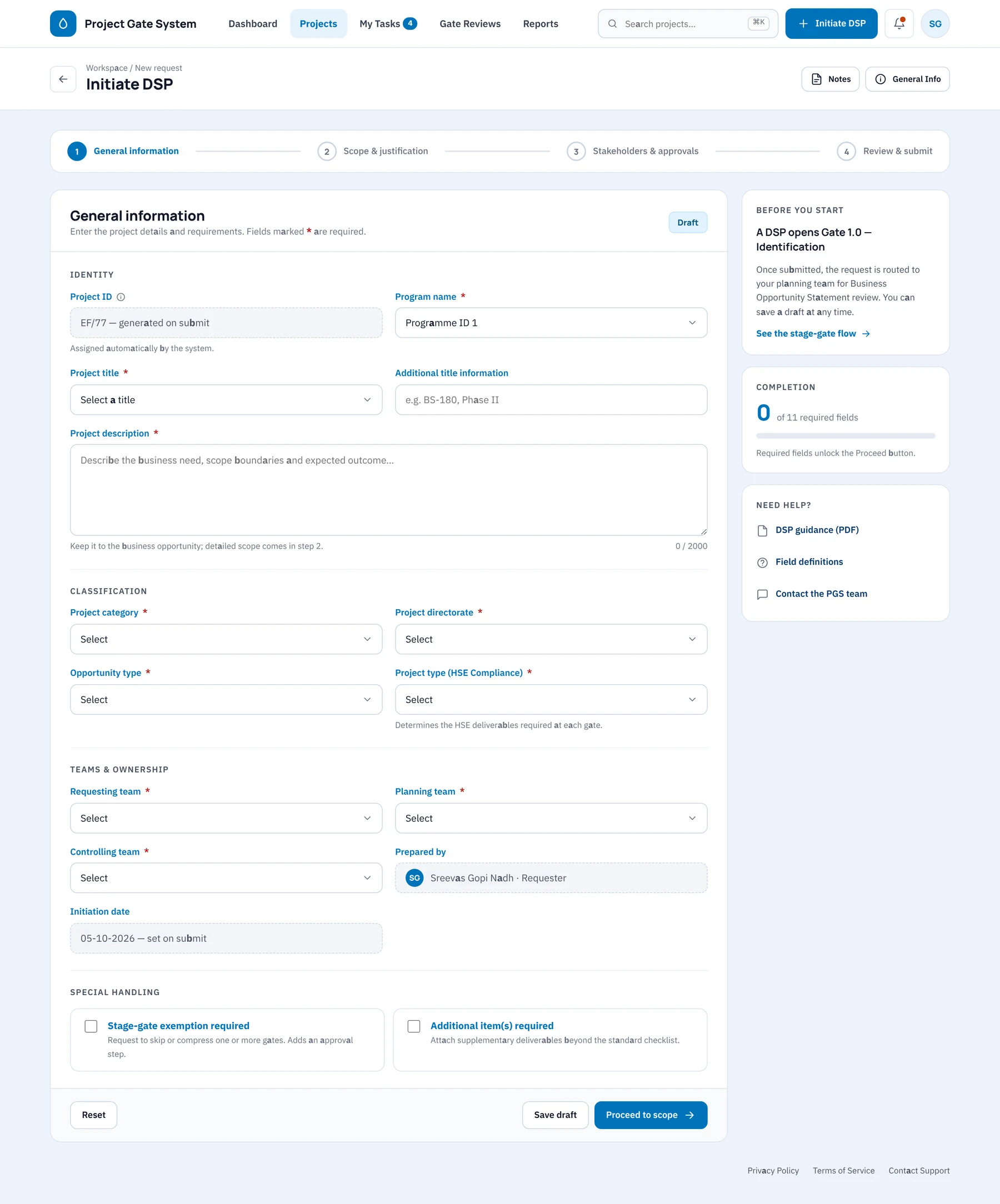
Step 02
Starting a project through guided steps
Initiate DSP replaces the paper form with four guided steps. Required fields are marked and system values are completed automatically. A side panel tracks completion and explains what happens after submission.
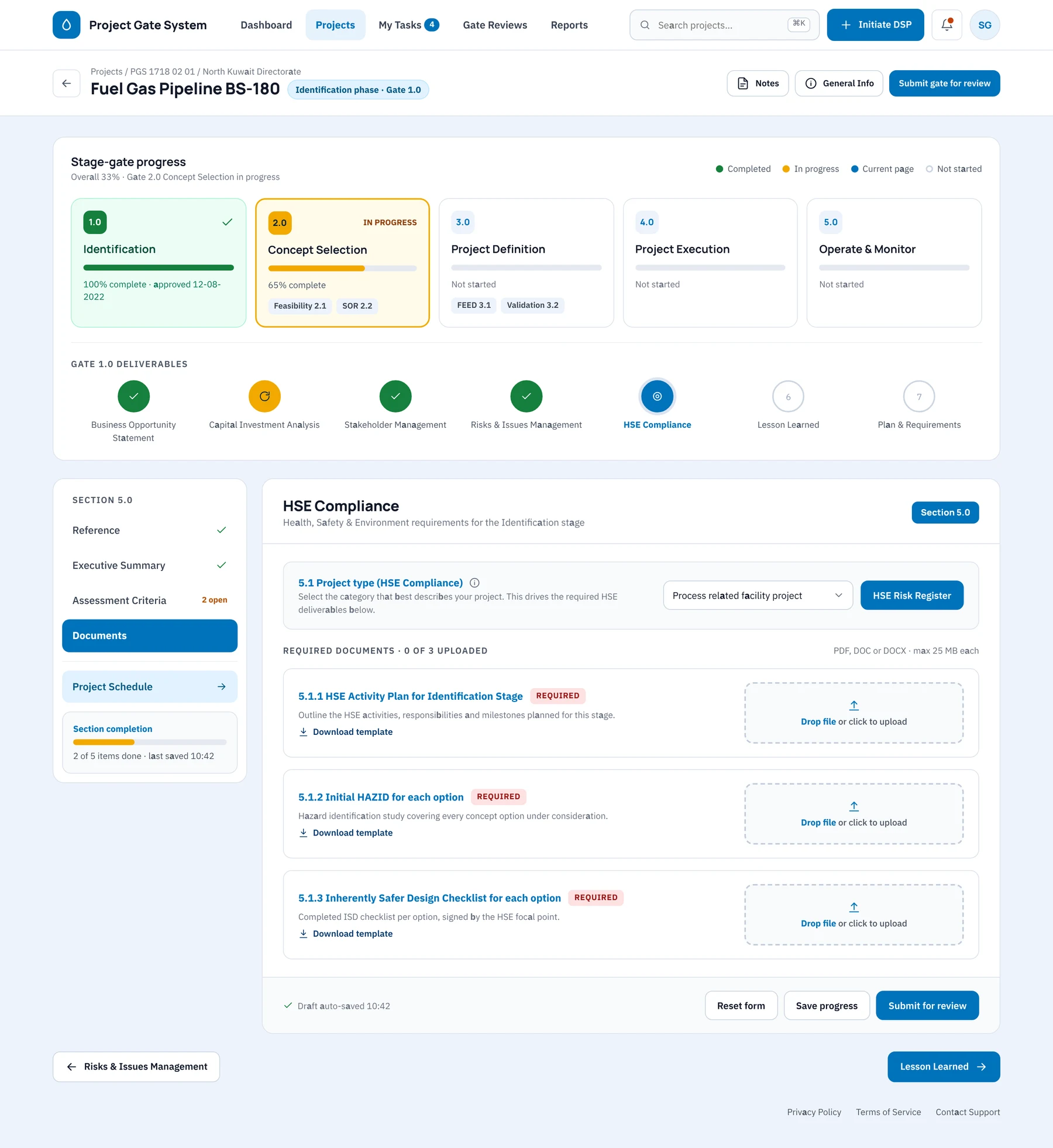
Step 03
Project status across five gates
Each project shows its five gates as cards, with the deliverables of the current gate presented as a step line. The open section appears as a form with required documents, templates and drag-and-drop upload.
Step 04
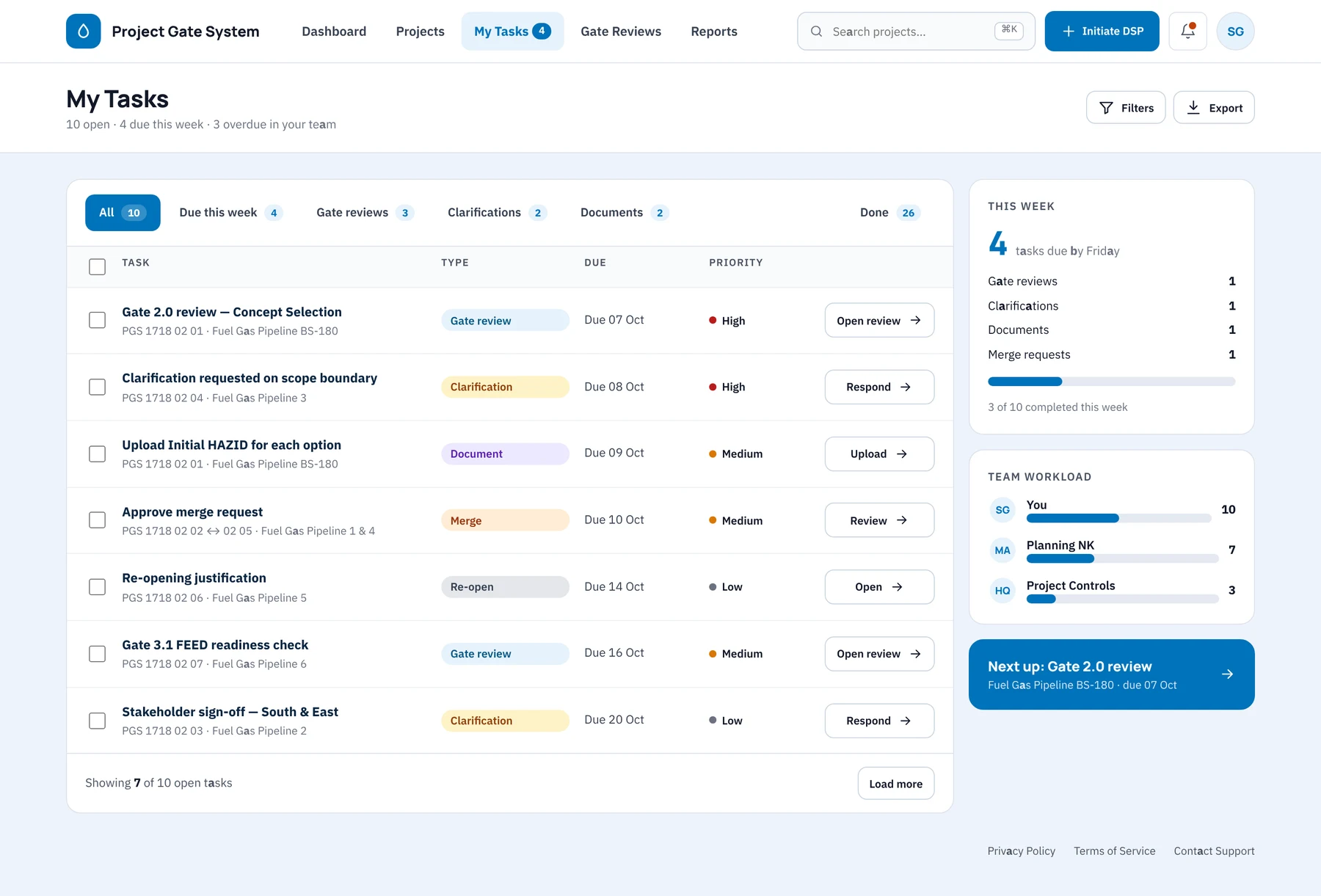
Tasks across every project
My Tasks consolidates gate reviews, clarifications, documents and merge requests into one list with due dates and priority. It also shows this week's load and the team's workload.
Step 05
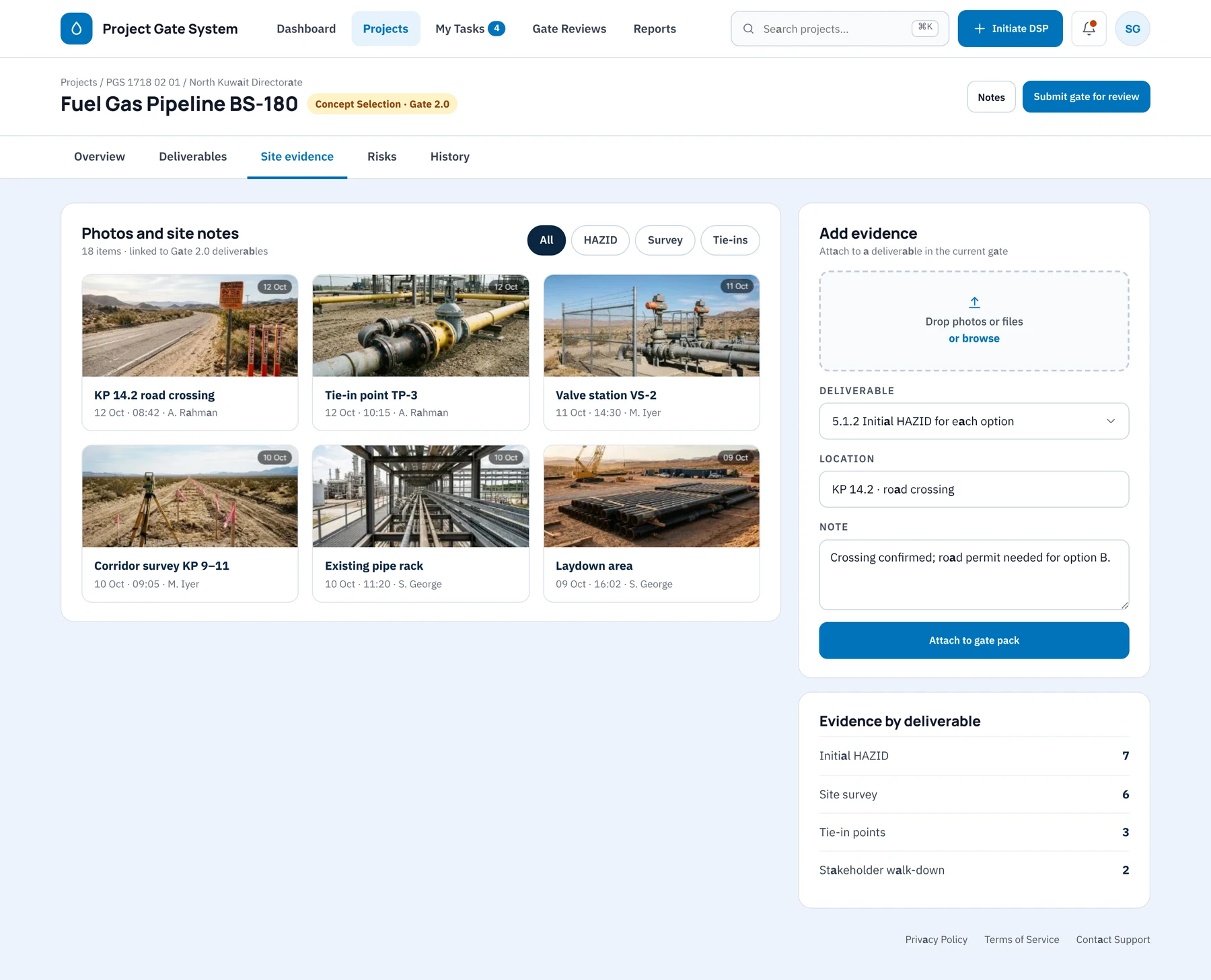
Site evidence linked to deliverables
Site photos and notes can be filtered by HAZID, survey or tie-in. Each is attached to the deliverable it supports, with its location, date and author, so the gate pack carries its own evidence.
Step 06
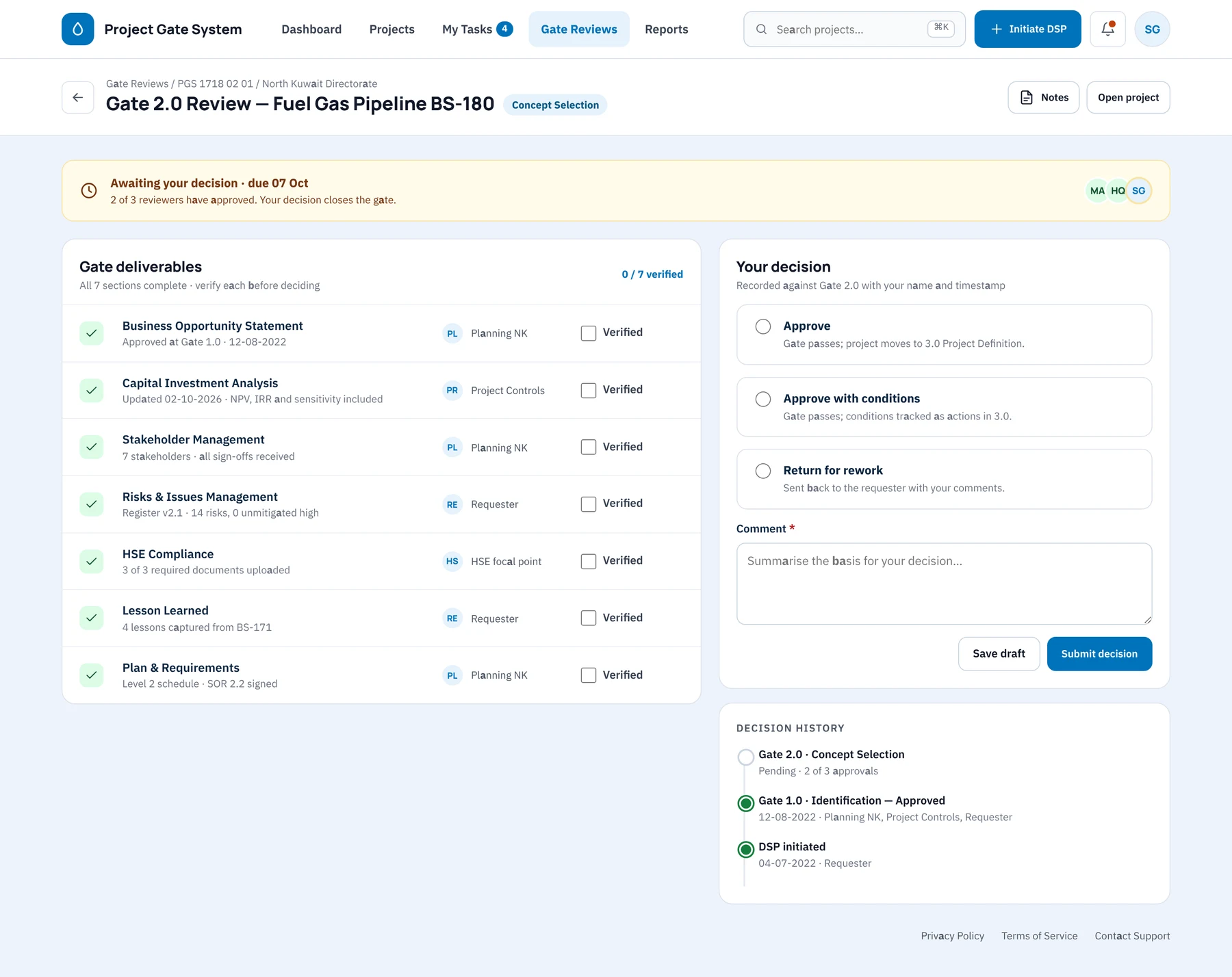
Reviewer verification before decision
A reviewer works through all seven deliverables and marks each as verified. The reviewer then records approve, approve with conditions or return for rework, with a comment, alongside the project's decision history.
Step 07
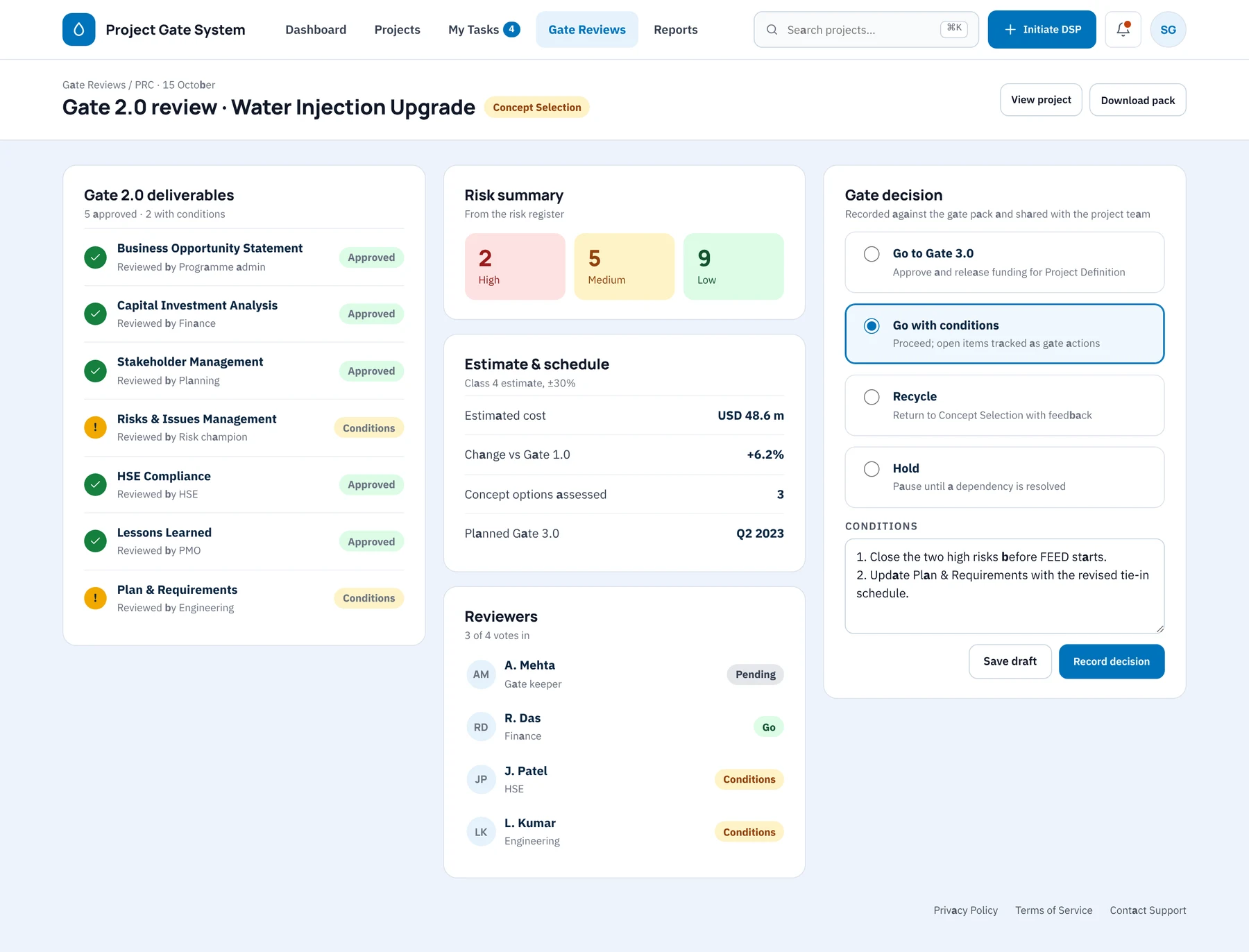
The committee decision on one screen
At the Project Review Committee, deliverable status, the risk summary, the estimate and schedule, and every reviewer's vote appear together. The gate is recorded as go, go with conditions, recycle or hold, and the conditions are written into the decision.
Step 08
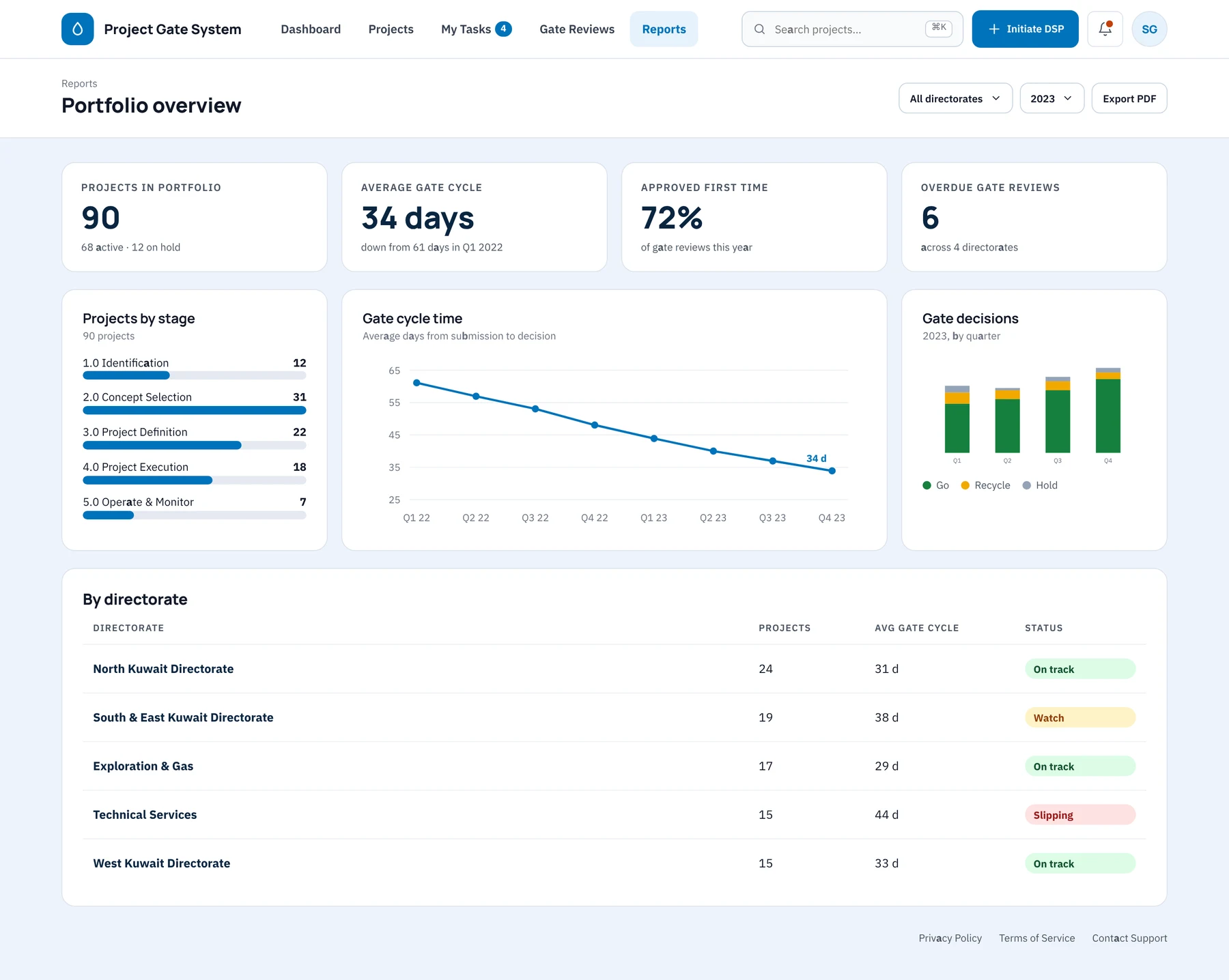
Portfolio reporting for leadership
Leaders can review projects by stage, average gate cycle time falling from 61 to 34 days, and decisions per quarter. A directorate table flags where the process is on track, on watch or slipping.
Step 09
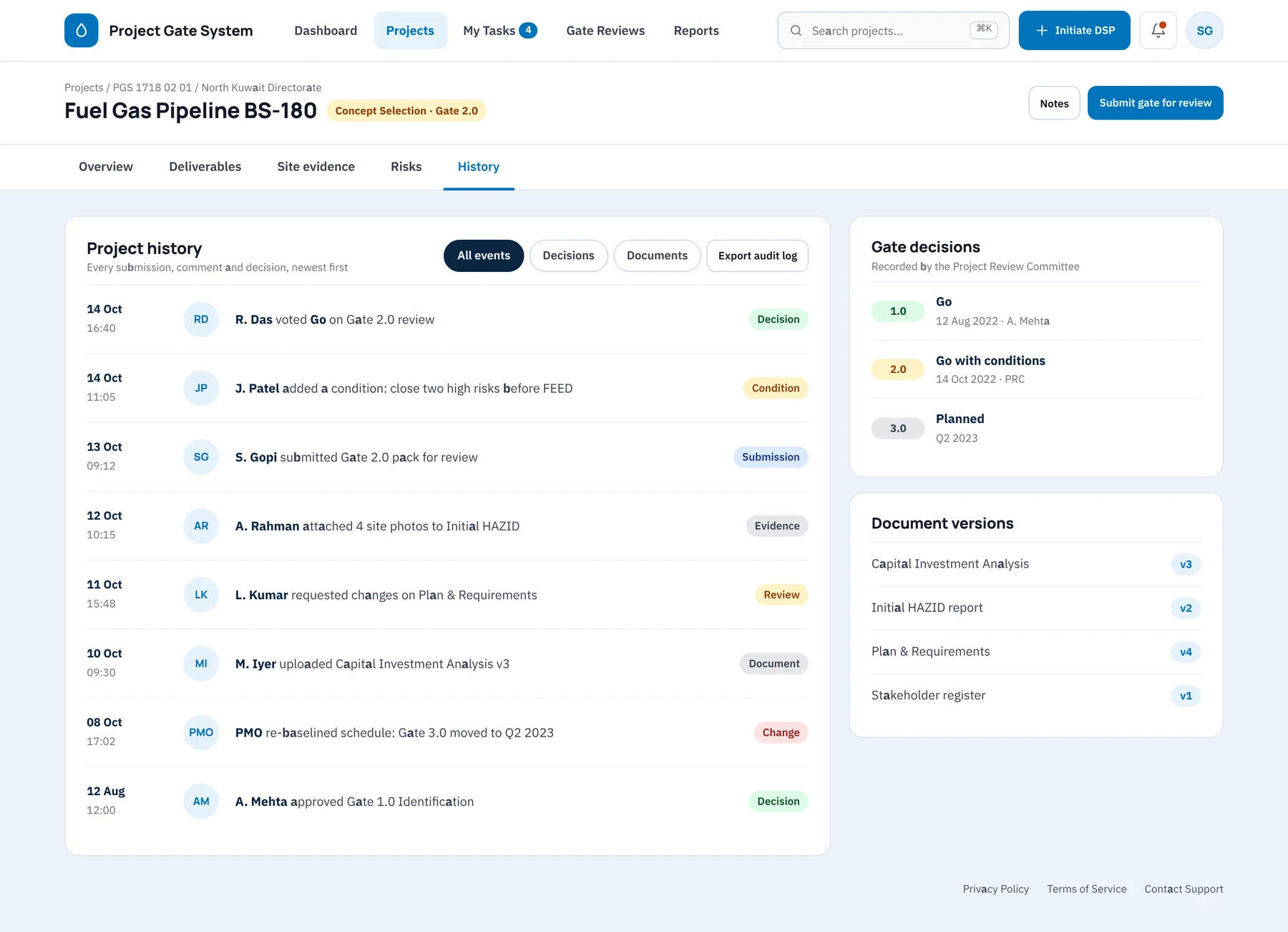
A full history for every project
Every submission, comment, document version and gate decision is logged against the project, with the person responsible and the time. The audit log exports in one click, so audits and hand-overs no longer depend on paper files.
Collaboration
How the team worked together
Two digital attempts had already failed, so the way we worked with the engineers and project managers mattered as much as the screens we produced.
Project Manager
Ran the change plan with me and paired every design milestone with a walkthrough for the teams who had rejected the earlier tools.
Business Analysts
Translated the stage-gate framework into rules and approval matrices, and checked each screen against the governance policy.
Developers
Built the gate workflow from annotated prototypes, and we reviewed each gate together before it went to testing.
QA Engineers
Tested gate transitions and document hand-offs using real project data from the field teams.
Project managers and engineers (users)
Took part in the sessions throughout and made the final judgement on whether the screens matched how their projects actually ran.
Where the team changed the design
In an early session, a field engineer said the previous tool 'did not look like our gate pack'. That comment set the direction for the whole interface: mirror the familiar paper structure stage by stage rather than introduce a new one.
Paths not taken
What we considered and set aside
After so many rejected tools, the options that appeared safest were the most tempting. We set each aside because it would have repeated the earlier failures.
Option 1
A generic project-management tool configured for gates
Why it was temptingAvailable off the shelf, with quick set-up.
Why we set it asideIts task-centred model hid the gate decisions leadership needed to see, and it was close to the tools people had already rejected.
Option 2
A document-management approach built around uploaded gate packs
Why it was temptingVery little change in behaviour for the teams.
Why we set it asideIt would have digitised the paper without removing the manual steps, so the sponsor would not have achieved the required efficiency gains.
Option 3
A single dashboard-first design for executives
Why it was temptingStrong visibility for leadership from day one.
Why we set it asideAdoption had to begin with the people doing the work. We therefore designed the project workspace first and allowed the executive view to develop from real data.
Outcome
PGS modernised project workflows and delivered clear operational gains.
30%
Increase in process efficiency
50%
Reduction in paper documentation
Higher
Adoption by PMs and field teams
Lower
Planning and execution cost
30% rise in process efficiency, with fewer delays and less manual work.
50% less paper-based documentation, in line with the sustainability goals.
Greater adoption and engagement from project managers and field teams.
Savings in planning and execution through better use of resources.
Positive feedback on the interface and the streamlined workflows.
Learnings & next steps
What I would carry forward
What I learned
01
Change management is design work. Walking through the interface with the teams who had rejected earlier tools shaped it more than any heuristic did.
02
Presenting the paper gate pack on screen, stage by stage, lowered resistance. Novelty for its own sake would have cost us adoption.
03
Once risk was visible at each gate, my conversations with leadership shifted from status updates to decisions.
Next steps
→
Add mobile capture for field survey and inspection reports so that data is entered where it is gathered.
→
Extend portfolio reporting to cost and schedule forecasts, as every gate decision and estimate is now captured digitally.
→
Measure the paper reduction formally against the sustainability target and report it quarterly.